
Telegram Mini App for a Fitness Club: Booking, Memberships, and Personal Account
How a Telegram Mini App can replace a website, app, and bot for a fitness club, providing clients with convenient online booking, membership payments, schedule viewing, and a personal account—without installation from the App Store or Google Play.
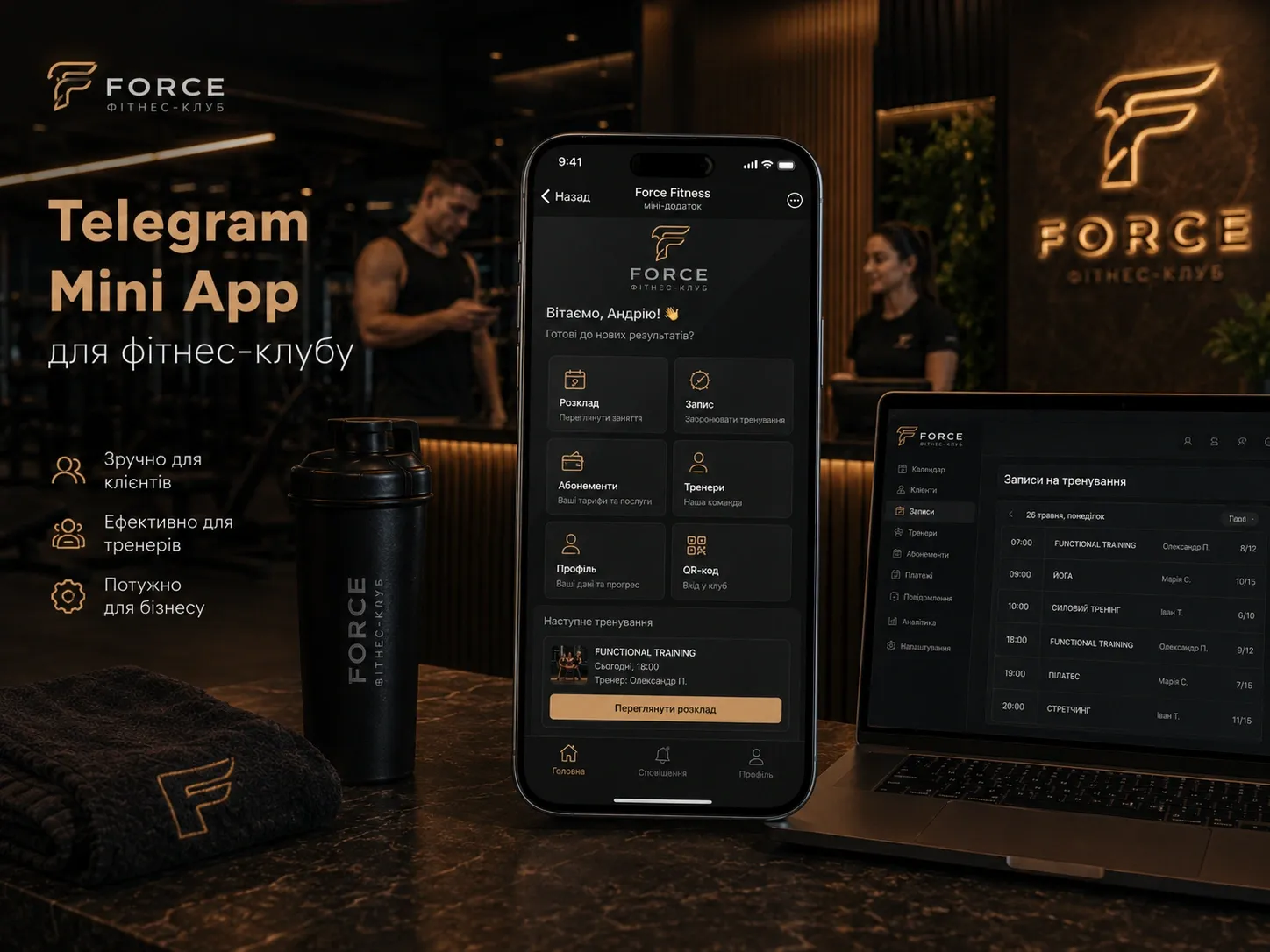
Fitness clubs face a challenge: clients want quick access to services via smartphone, but developing a native app is expensive, and installing it from the App Store or Google Play is an extra step. A Telegram bot helps with basic tasks but cannot replace a full-fledged interface. A website requires separate authorization and is not always convenient on mobile devices.
Telegram Mini App (TMA) solves these problems: it is a mini-app within the messenger that works like a website but does not require installation. Clients open it via a link or button in the bot and get a full-fledged account with a class catalog, schedule, online booking, membership payments, QR code for entry, and a loyalty program.
In this article, we will explore what features can be implemented in a Telegram Mini App for a fitness club, how it differs from a bot, website, and native app, and why this format is becoming the optimal solution for modern clubs and studios.
What Features Can Be Implemented in a Telegram Mini App for a Fitness Club
Telegram Mini App allows creating a full-fledged personal account for clients with all necessary functions. Let’s consider the key ones using the example of a typical TMA architecture for a fitness business.
1. Class Catalog and Schedule
Clients see an up-to-date catalog of group and personal classes with descriptions, difficulty levels, and trainers. The schedule is automatically generated based on data from the club’s CRM or ERP system. Possible filters:
- by class type (yoga, functional training, boxing, etc.);
- by skill level (beginner, intermediate, advanced);
- by trainer;
- by day of the week and time.
Example. A client opens the TMA, selects the "Yoga" filter → sees a list of all yoga classes for the week → navigates to the page of a specific class to book it.
2. Online Booking for Workouts
Booking a class takes just a few clicks:
- The client selects a class from the schedule.
- Chooses a date and time (if multiple sessions are available).
- Confirms the booking.
- Receives a notification in Telegram about successful registration.
Technical nuances:
- The class limit is set in the admin panel and updated in real-time.
- If the client has an active membership with a visit limit, the system automatically deducts one visit.
- If the membership has expired or is absent, the client sees a "Pay" button.
3. Personal Account: Memberships, Balance, and Visit History
In the personal account, the client sees:
- Active memberships: type, validity period, number of available visits.
- Balance: if the membership is unlimited for a certain period or includes a visit limit.
- Visit history: dates, class names, trainers.
- Frozen memberships: freeze duration and remaining days.
Example. A client opens the account and sees: "Membership '12 Yoga Classes' — 7/12 visits used." If only 2 visits remain, the system can send a reminder: "2 classes left. Book your next one!"
4. Membership and Single-Class Payments
Telegram Mini App supports payments through integration with payment systems (LiqPay, WayForPay, Fondy, Stripe, etc.). The client can:
- purchase a new membership;
- extend an existing one;
- pay for a single visit;
- top up the balance for future purchases.
Additional features:
- A "Promotions" section where clients can buy discounted memberships.
- The ability to split payments into installments (if the club’s business logic allows it).
- Automatic generation and sending of fiscal receipts.
5. QR Code for Club Entry
After purchasing a membership or booking a class, the client receives a unique QR code in their personal account. When visiting the club, an employee scans the QR code using a special app or tablet, and the system automatically records the visit.
Advantages:
- Eliminates the need for paper memberships or plastic cards.
- Reduces queues at the reception.
- Prevents fraud (the QR code is generated dynamically and is valid only for a specific client and class).
6. Freezing Memberships
Clients can freeze their memberships directly in the TMA if they do not plan to visit the club for a certain period. To do this:
- Open the personal account.
- Select an active membership.
- Click the "Freeze" button.
- Specify the start and end dates of the freeze.
- Confirm the action.
The system automatically blocks the membership for the specified period and extends its validity after the freeze ends.
7. Loyalty Program and Bonuses
A loyalty program can be implemented in the Telegram Mini App with the following features:
- Earning bonuses for attending classes, referring friends, or participating in promotions.
- Using bonuses to pay for memberships or single visits.
- Issuing personal promo codes for clients.
- A tiered system (e.g., "Silver," "Gold," "Platinum") with additional privileges.
Example. A client attends 10 classes in a row and receives a bonus of +1 visit to their membership. Or accumulates 500 bonuses and can exchange them for a 20% discount on the next membership.
8. Notifications and Communication
Telegram Mini App integrates with the messenger’s notification system, allowing the club to send clients:
- Reminders about upcoming classes (24 hours and 1 hour before).
- Notifications about membership expiration.
- Updates about new promotions and discounts.
- Personalized offers (e.g., "Your membership expires in 3 days. Would you like to extend it with a 15% discount?").
Advantage over email newsletters: Telegram notifications have a higher delivery and open rate compared to email.
Technical Architecture of a Telegram Mini App for a Fitness Club
Telegram Mini App is a web application that runs within the messenger. It consists of two parts:
- Frontend: the client interface, written in JavaScript (React, Vue.js, or Svelte). Hosted on any hosting or CDN.
- Backend: the server-side part that processes requests, interacts with the database, and integrates with the club’s CRM, ERP, payment systems, and other services.
How Interaction with Telegram Works
- The client receives a link to the TMA (e.g., via a bot or a post in the club’s channel).
- Upon clicking, Telegram opens the web app in an embedded browser.
- The TMA receives user data (user_id, name, phone number) via the Telegram Web App API.
- The frontend sends requests to the backend, which interacts with the club’s CRM to retrieve data about memberships, schedules, etc.
- After payment or booking, the backend updates the data in the CRM and sends a confirmation to the client.
Integrations Needed for a Fitness Club
For full functionality, the TMA needs to integrate with:
- CRM/ERP: for managing memberships, clients, schedules, and finances.
- Payment systems: for accepting online payments.
- Access system: for scanning QR codes at the club entrance.
- Email/SMS gateways: if duplicate notifications are needed (though Telegram itself is an effective channel).
Format Limitations
Telegram Mini App has some technical limitations compared to native apps:
- No push notifications outside the messenger. Clients receive notifications only in Telegram.
- Limited access to hardware features of the smartphone (e.g., NFC for contactless entry cannot be used).
- Dependency on Telegram: if the client does not have the messenger or is not authorized, the TMA will not work.
- Interface limitations: fewer customization options compared to native apps.
However, for most fitness club tasks, these limitations are not critical, and the advantages outweigh the drawbacks.
Telegram Mini App vs Bot vs Website vs Native App: Comparison
| Criteria | Telegram Mini App | Telegram Bot | Website | Native App |
|---|---|---|---|---|
| Installation | Not required | Not required | Not required | Required from App Store / Google Play |
| Authorization | Automatic via Telegram | Automatic via Telegram | Required (email/password or social media) | Required (email/password or social media) |
| Interface | Full-fledged web interface | Text-based or button-based | Full-fledged web interface | Native interface |
| Functionality | High (personal account, payment, QR) | Limited (booking, reminders, payment) | High (but poorer mobile adaptation) | High |
| Notifications | Via Telegram | Via Telegram | Email/SMS or push (if PWA) | Push notifications |
| Development Speed | Medium | Fast | Medium | Slow |
| Development Cost | Medium | Low | Medium | High |
| Accessibility | Only for Telegram users | Only for Telegram users | For everyone | For everyone |
| Integrations | All possible (CRM, payments, QR, etc.) | Limited | All possible | All possible |
| Updates | Instant (web technologies) | Instant | Instant (if no cache) | Requires App Store update |
When to Choose Telegram Mini App
Telegram Mini App is the optimal choice for a fitness club if:
- Your audience actively uses Telegram.
- You want to provide clients with a convenient personal account without developing a native app.
- Integration with CRM, payments, schedules, and QR codes is needed.
- You aim to reduce development and support costs compared to a native app.
When to Choose a Telegram Bot
A bot is suitable for simple tasks if:
- You need to quickly implement online booking and basic notifications.
- The development budget is limited.
- A full-fledged personal account with a schedule and payments is not required.
When to Choose a Website
A website remains relevant if:
- You want to reach the maximum audience (including those who do not use Telegram).
- Full mobile adaptation (PWA) is needed.
- You plan to develop content marketing and SEO.
When to Choose a Native App
A native app makes sense if:
- You have a large client base willing to install the app.
- Complex features are needed (e.g., workout tracking, integration with fitness trackers).
- You want to maximize interface customization and use smartphone hardware features.
Steps to Implement a Telegram Mini App for a Fitness Club
If you decide to implement a TMA for your club, follow this algorithm:
1. Define Functional Requirements
Create a list of features that should be included in the mini-app:
- Personal account (memberships, balance, history).
- Schedule and online booking for classes.
- Membership and single-visit payments.
- QR code for entry.
- Freezing memberships.
- Loyalty program.
- Notifications.
2. Choose Technical Architecture
- Frontend: React/Vue.js for rapid interface development.
- Backend: Node.js, Python, or PHP for request processing.
- Database: PostgreSQL or MongoDB for data storage.
- Integrations: CRM, payment systems, access system.
3. Develop the Design
- Create prototypes of key screens (personal account, schedule, payment, etc.).
- Ensure mobile interface usability.
- Use the club’s branding colors and style.
4. Implement Integrations
- Connect the CRM for managing memberships and clients.
- Set up payment systems for accepting online payments.
- Integrate the access system for scanning QR codes.
- Connect the Telegram notification system.
5. Test and Launch
- Conduct internal testing with the club’s team.
- Launch beta testing for a limited group of clients.
- Gather feedback and make adjustments.
- Publish the TMA and train the club’s staff to work with the new system.
6. Promote the Mini-App
- Place a link to the TMA in the club’s bot.
- Add a "Open in Telegram" button on the website and social media.
- Send notifications to clients about the new feature.
- Run a promotion (e.g., a discount on membership for the first booking via TMA).
Conclusion: Why Telegram Mini App Is the Future for Fitness Clubs
Telegram Mini App combines the advantages of a bot, website, and native app while eliminating their drawbacks:
- No installation required — clients open the app directly in Telegram.
- Full-fledged personal account — unlike a bot, where the interface is limited to buttons.
- Quick access — authorization via Telegram takes seconds.
- Integration with CRM and payments — all data is synchronized in real-time.
- Low development cost compared to a native app.
For a fitness club, TMA becomes a convenient tool for both clients and the business:
- Clients get instant access to schedules, booking, payments, and personal accounts.
- The club reduces the load on the reception, automates processes, and increases client loyalty.
If your audience uses Telegram, a Telegram Mini App can become the most effective channel for interacting with clients — without unnecessary development and marketing costs.
Consider implementing a TMA today to stay ahead of competitors and provide clients with a modern digital experience.
Ready to automate client interactions via Telegram?
We develop Telegram Mini Apps with custom personal accounts, online booking, membership payments, and CRM integration. Contact us to get a solution that will reduce the load on your reception and increase client loyalty.
FAQ
Do clients need to install an app to use the Telegram Mini App?
No, Telegram Mini App works within the Telegram messenger and does not require installation from the App Store or Google Play. Clients just need to follow a link or click a button in the club’s bot.
Which payment systems can be integrated into a Telegram Mini App for a fitness club?
Any payment systems that support API-based payments can be integrated into a Telegram Mini App: LiqPay, WayForPay, Fondy, Stripe, PayPal, etc. Telegram Payments is also available as a built-in option.
Can a Telegram Mini App be used without a CRM?
Technically, yes, but without a CRM, you lose the ability to automate membership, schedule, and client base management. CRM integration allows real-time data synchronization and avoids manual input.
How is the Telegram Mini App protected against QR code fraud?
The QR code in the Telegram Mini App is generated dynamically for each client and is valid only for a specific class. When scanned, the system checks the unique identifier tied to the client’s membership, preventing counterfeiting.
Can a Telegram Mini App be integrated with an existing club access system?
Yes, a Telegram Mini App can be integrated with any access system that supports API or QR code scanning. For example, if you have turnstiles with QR scanners, the mini-app can generate compatible codes for your equipment.
Is a Telegram Mini App suitable for large fitness chains?
Yes, Telegram Mini App is suitable for both small studios and large chains. Thanks to CRM and ERP integration, multiple clubs can be managed centrally, synchronizing schedules and memberships between them.