
Comprehensive Hotel System: Website, Booking, CRM/PMS, Payments & Analytics
How to integrate a website, online booking, CRM/PMS, payments, guest portal, and analytics into a unified digital ecosystem for hotels. A practical guide for owners and managers.
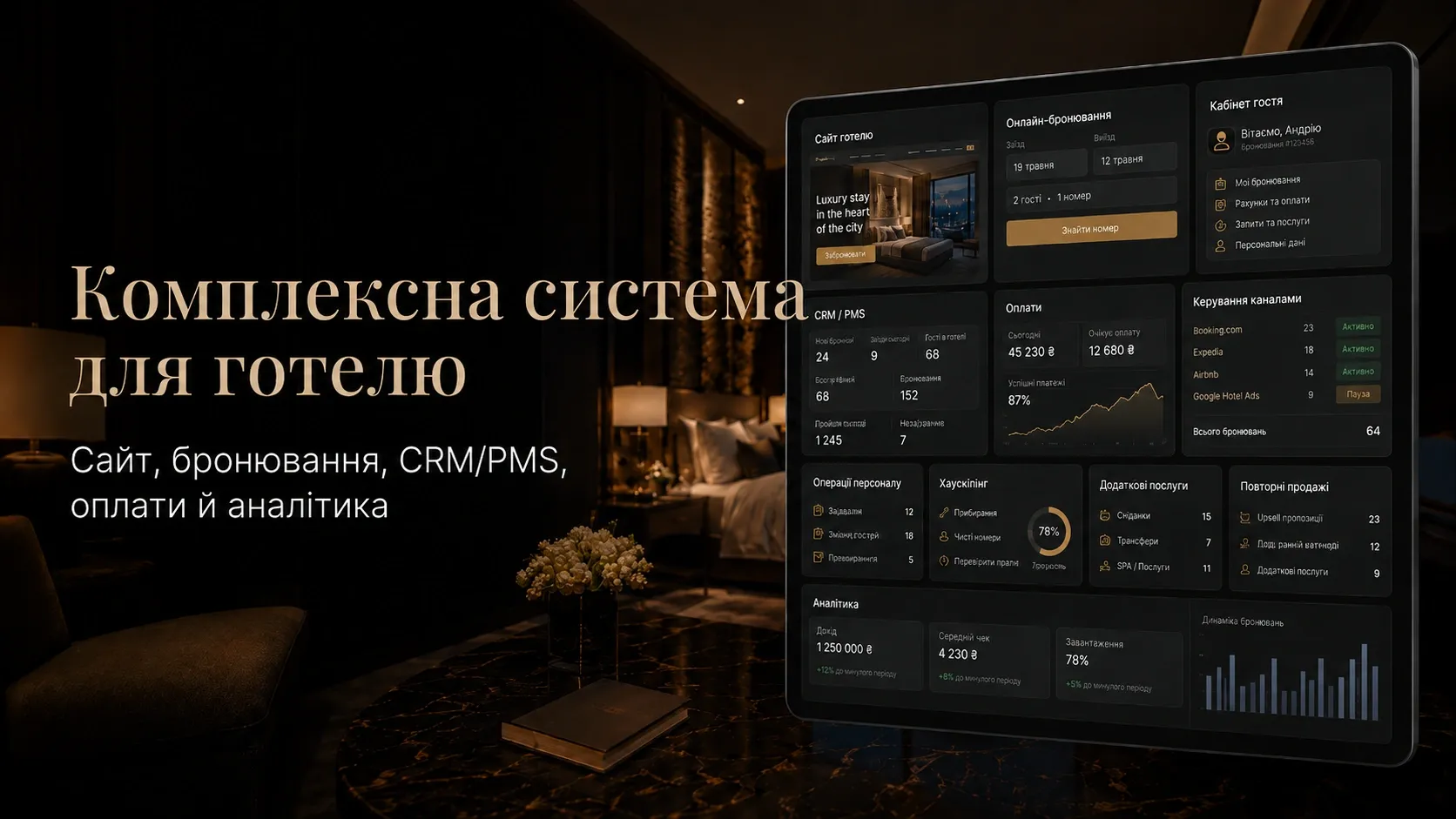
Every day, hotels face dozens of disjointed processes: bookings from multiple channels, manual data entry into spreadsheets, lack of synchronization between departments, lost payments, and guests who don’t return. Each of these issues represents real losses: money, time, and reputation.
In this article, we’ll explore how to create a unified digital ecosystem for your hotel, where all tools work together seamlessly—from a guest’s first Google search to booking, check-in, payments, service, repeat visits, and management analytics.
Why Hotels Need a Comprehensive System
Without an integrated system, hotels encounter the following problems:
- Disjointed data: Bookings from Booking.com don’t sync with your website, guest requests get lost in emails, and financial reports are compiled manually.
- Lost sales: Guests choose competitors because your website doesn’t offer instant booking or online payments.
- Low staff efficiency: Employees spend 30–50% of their time on routine tasks (checking bookings, generating invoices, coordinating with housekeeping).
- Lack of analytics: It’s impossible to track which channels bring the most revenue, which rooms are most popular, or which guests return.
- Poor guest experience: No personal portal, online check-out, or ability to order additional services without calling reception.
The result? A 15–30% drop in revenue due to inefficiencies and dissatisfied guests.
Components of a Comprehensive Hotel System
1. Hotel Website with Online Booking
A website isn’t just a business card—it’s your primary sales tool. It should be:
- Fast and responsive: 53% of users abandon a site if it takes longer than 3 seconds to load (Google, 2023).
- User-friendly for booking: The booking form should be accessible on every page, with minimal fields (name, dates, number of guests, room type).
- SEO-optimized: So guests can find you in search results for queries like “hotel in Kyiv with online booking” or “villa near Lviv for family vacations.”
- Integrated with payment systems: Guests should be able to pay via LiqPay, WayForPay, Stripe, or other popular gateways.
Example: A hotel website with a booking module that automatically updates room availability in real time and syncs with the CRM/PMS.
2. CRM/PMS: The Central Management System
A CRM/PMS (Property Management System) is the “brain” of the hotel, unifying all processes:
- Booking management: A single database for all bookings from the website, OTAs (Booking.com, Airbnb), and phone inquiries.
- Check-in/check-out: Fast check-in via the guest portal or reception, with automatic invoice generation.
- Room management: Tracking room status (occupied, booked, cleaning in progress) and assigning tasks to housekeeping.
- Financial accounting: Automatic invoice generation, payment tracking, and integration with accounting systems.
- Guest communication: Automated emails and SMS for booking confirmations, check-in reminders, and review requests.
Key criteria for choosing a CRM/PMS:
- Integration with your website and payment systems.
- Ability to connect a channel manager (for syncing with OTAs).
- Flexible role-based access for staff (reception, housekeeping, management).
- Analytical reports (occupancy rates, revenue by channel, average check).
3. Guest Portal: Convenience and Upselling
A guest portal is a tool for boosting loyalty and generating additional revenue. It should include:
- Booking history: Guests can view past and upcoming reservations.
- Online check-out: Pre-fill data for expedited check-in.
- Additional services: Order transfers, breakfasts, spa treatments, bike rentals, etc.
- Loyalty program: Earn points for bookings, redeemable for discounts or free nights.
- Support chat: Quickly resolve issues without calling reception.
Example: A hotel offers airport transfers directly in the guest portal, increasing the average check by 20–25%.
4. Payments: Security and Convenience
Guests expect to pay for bookings online, not upon check-in. Requirements:
- Integration with payment gateways: LiqPay, WayForPay, Stripe, PayPal, etc.
- Automatic invoice generation: Guests receive an invoice via email with a one-click payment option.
- Partial payments: For example, 30% at booking, 70% at check-in.
- Refunds: Automatic refunds for canceled bookings.
Important: The payment system must comply with PCI DSS standards for customer data protection.
5. Channel Manager: Syncing with OTAs
A channel manager automatically syncs prices and room availability between your website and online travel agencies (Booking.com, Airbnb, Expedia, etc.).
Benefits:
- Avoids double bookings for the same room.
- Updates prices and availability in real time.
- Reduces staff workload.
Selection criteria:
- Supports all major OTAs.
- Allows setting different prices for different channels.
- Provides revenue analytics per channel.
6. Staff and Housekeeping Management
Efficient staff operations are key to guest satisfaction. Tools needed:
- Task management: Automatic task creation for housekeeping (cleaning rooms after guest check-out) and progress tracking.
- Mobile app for staff: Employees receive tasks, update room statuses, and communicate with colleagues via smartphone.
- Chat or bot: Instant communication between reception, housekeeping, and management.
- Productivity reports: Track how many rooms each employee cleaned per shift.
Example: After a guest checks out, the system automatically assigns a cleaning task and notifies the responsible staff member via smartphone.
7. Additional Services and Repeat Sales
Additional services are an extra revenue stream for hotels. How to sell them effectively:
- Package deals: For example, “Romantic Evening” (bike rental + picnic in the room + spa treatments).
- Automated offers: After booking, guests receive an email with a discount on transfers or breakfasts.
- Loyalty program: Earn points for bookings, redeemable for free nights or services.
- Retargeting: Bring guests back with personalized email offers (e.g., a 15% discount on their next stay).
Example: A hotel sends a follow-up email a week after check-out with a 15% discount on the next booking, increasing repeat reservations by 20–30%.
8. Analytics: Data-Driven Decisions
Without analytics, hotels operate blindly. What to track:
- Room occupancy: Which rooms are most popular, and on which dates demand peaks.
- Revenue by channel: Which booking channels (your website, Booking.com, Airbnb) bring the most profit.
- Average check: How it fluctuates by season and booking channel.
- Repeat bookings: How many guests return and which services they order.
- Reviews and ratings: Analyze feedback on OTAs and your website to improve service.
Tools:
- Built-in CRM/PMS analytics.
- Google Analytics for website traffic.
- Dashboards with key metrics (e.g., RevPAR—revenue per available room).
How to Implement a Comprehensive System: Step-by-Step Plan
- Audit current processes: Identify weak points and processes needing automation.
- Choose tools: Select a CRM/PMS, payment systems, channel manager, and other components.
- Develop the website: Create a site with online booking, a guest portal, and CRM integration.
- Integrate systems: Connect payment gateways, channel manager, email campaigns, and other services.
- Train staff: Conduct workshops on using the new system.
- Test and launch: Test all processes and go live.
- Monitor and optimize: Regularly analyze data and make improvements.
Conclusion
A comprehensive hotel system isn’t a luxury—it’s a necessity for staying competitive. It unites your website, booking, CRM/PMS, payments, guest portal, and analytics into a seamless ecosystem that drives:
- Increased direct sales via your website.
- Reduced staff workload.
- Improved guest experience.
- Higher repeat bookings.
- Data-driven decision-making.
Start small: implement a CRM/PMS, add online booking to your website, and automate payments. Then, layer in other components to build a full-fledged digital ecosystem for your hotel.
Remember: Every day without automation is lost revenue and dissatisfied guests.
Need a comprehensive system for your hotel?
We develop integrated solutions for hotels: from websites with online booking to CRM/PMS, payment systems, and analytics. Contact us for a consultation and start automating today.
FAQ
Can a comprehensive system be implemented in stages?
Yes, you can start with the most critical components: CRM/PMS and a website with online booking. Then, add payment systems, a channel manager, a guest portal, and other tools.
How do I choose a CRM/PMS for my hotel?
Look for integrations (website, payments, OTAs), flexible staff roles, analytical reports, and scalability. A user-friendly mobile app for staff is also important.
How long does it take to implement a comprehensive system?
It depends on the hotel’s size and the number of components. For a small hotel, it may take 2–3 months; for a chain, 6–12 months.
How can I convince staff to use the new system?
Train them and highlight the benefits: less routine work, fewer errors, and quicker access to information. Involve key employees in tool selection.
Do I need a separate channel manager if I already have a CRM/PMS?
Yes, a channel manager specializes in syncing with OTAs. Many CRM/PMS include one, but it may not be robust enough for large hotels.