
CRM vs. Excel for Dentistry: When Spreadsheets Are No Longer Enough
Discover when Excel stops handling dental clinic patient records effectively and how a CRM system helps manage appointments, communication, repeat visits, and staff performance.
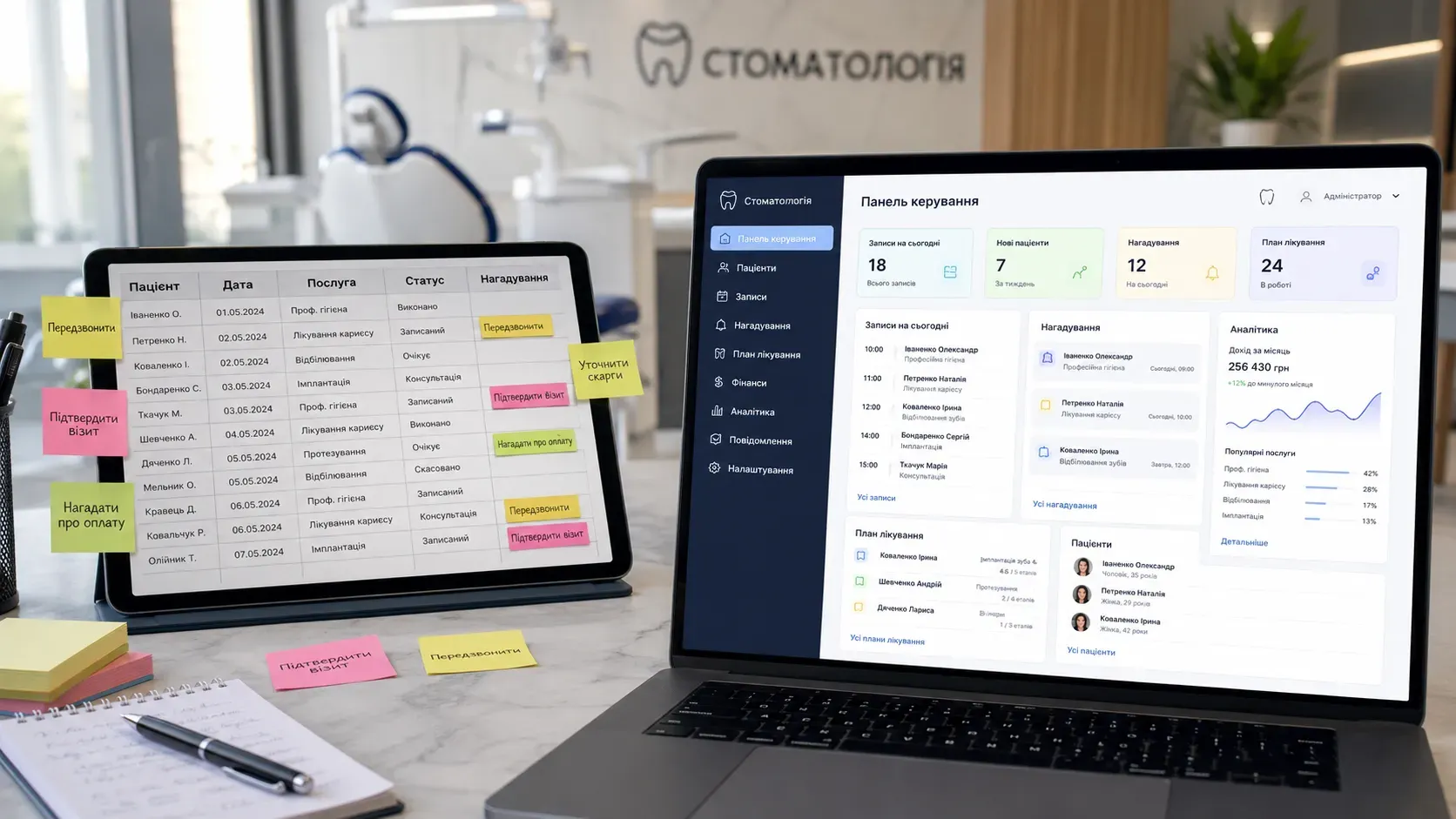
In a small dental clinic, Excel or Google Sheets may seem like convenient tools for patient records. However, as the business grows, manual spreadsheet management begins to create more problems than it solves. Let’s explore when spreadsheets can still work and when they become a bottleneck for clinic growth.
When Excel or Google Sheets Still Work
Spreadsheets can be effective in the following cases:
- Small patient volume – up to 100 active clients per month.
- Limited services – the clinic provides 2-3 types of services without complex follow-up visits.
- Single employee – records are managed by one person who doesn’t need oversight.
- No automation needed – no requirement for reminders, appointment statuses, or analytics.
Under these conditions, Excel or Google Sheets allow quick data entry without additional software costs.
When Spreadsheets Start Causing Problems
As the clinic grows, spreadsheets fail to handle key tasks:
-
Lack of complete patient history
- It’s difficult to store all visits, diagnoses, X-rays, and doctor recommendations in a spreadsheet.
- Finding information quickly is nearly impossible.
-
No appointment status tracking
- It’s impossible to track whether a patient confirmed, rescheduled, or canceled an appointment.
- Important appointments can be missed due to human error.
-
Manual reminders
- Administrators must send SMS or call patients manually to remind them of appointments.
- High risk of forgetting follow-up visits or check-ups.
-
No staff performance control
- It’s impossible to track which administrator processed a request or delayed a response.
- No role-based access—everyone sees and edits the same data.
-
Issues with repeat visits
- Hard to track patients needing follow-up treatments or preventive care.
- No automatic reminders for patients about upcoming visits.
-
No analytics
- Spreadsheets don’t allow quick analysis of attendance, popular services, or revenue over time.
- Reporting for strategic decisions is impossible.
-
Fragmented data
- Patient information is scattered across spreadsheets, messengers, and notes, complicating search and processing.
- No single source of truth leads to confusion and errors.
How a CRM Solves These Problems
A CRM system for dentistry automates key processes and eliminates errors associated with manual record-keeping.
Appointment and Request Management
- Automatic appointment confirmations – patients receive SMS or email reminders about visits.
- Appointment statuses – track whether a patient confirmed, rescheduled, or canceled.
- Calendar integration – appointments automatically appear in doctors’ and administrators’ calendars.
Unified Patient Database
- Complete visit history – stores all treatment data, diagnoses, X-rays, and recommendations.
- Quick search – patient information can be found in seconds.
- Single source of truth – all data is stored in one place, eliminating confusion.
Automatic Reminders and Communication
- Visit reminders – the system sends SMS or email reminders to patients a day before appointments.
- Follow-up visits – CRM reminds patients about check-ups or additional treatments.
- Message templates – administrators can use ready-made templates for patient communication.
Staff Performance Control
- Roles and access permissions – each employee sees only the information they need.
- Activity tracking – monitor which administrator processed a request or delayed a response.
- Productivity analytics – reports show how many appointments each staff member handled over a period.
Analytics and Reporting
- Attendance reports – analyze which services are popular and which need promotion.
- Financial reports – the system shows revenue over a period, average bill, and service profitability.
- Forecasting – data-driven planning for clinic growth and workflow optimization.
Excel vs. CRM for Dentistry: Comparison
| Criteria | Excel / Google Sheets | CRM System |
|---|---|---|
| Patient records | Manual, difficult to track visit history | Automated, full patient history |
| Appointment statuses | None | Automated tracking |
| Reminders | Manual SMS or calls | Automatic SMS/email |
| Staff control | None | Role-based access, activity tracking |
| Repeat visits | Hard to track | Automatic reminders and planning |
| Analytics | Limited or none | Advanced reports and forecasting |
| Single data source | No | Yes |
How to Choose a CRM for Dentistry
When selecting a CRM, pay attention to these features:
- Calendar integration – appointments should automatically sync with doctors’ schedules.
- Automatic reminders – the system should send SMS or email notifications to patients.
- Mobile access – administrators and doctors should access the system from any device.
- Reports and analytics – ability to generate attendance, revenue, and staff productivity reports.
- Roles and permissions – each employee should see only the information they need.
- Messenger integration – ability to send automatic messages via Viber, Telegram, or WhatsApp.
Conclusion
Excel or Google Sheets may work for small dental clinics with minimal patient volume. However, as the business grows, manual spreadsheet management becomes inefficient, leading to errors, data loss, and uncontrollable chaos.
A CRM system automates key processes, controls appointments, patient communication, staff performance, and provides data-driven insights for strategic decisions. Transitioning to a CRM optimizes clinic operations, improves service quality, and increases revenue.
If your clinic is already struggling with spreadsheet limitations, it’s time to consider implementing a CRM system.
Ready to automate your dental clinic’s operations?
At SwiftyFlux, we’ll develop a CRM system tailored to your business needs—from patient records to analytics and automatic reminders. Leave a request, and we’ll help optimize your clinic’s processes.
FAQ
What are the advantages of a CRM for dentistry over Excel?
A CRM system automates patient records, tracks appointment statuses, sends automatic reminders, controls staff performance, and provides analytics. Unlike Excel, a CRM ensures a single source of truth, eliminating confusion and errors.
When should you switch from Excel to a CRM?
Consider switching to a CRM when your patient volume exceeds 100 per month, follow-up visits are needed, automatic reminders are required, or you need to monitor multiple administrators. A CRM is also essential if you want to analyze clinic attendance and revenue.
What features should a CRM for dentistry include?
A CRM for dentistry should include automatic appointment reminders, calendar integration, staff access roles, attendance and revenue reports, and the ability to store complete patient histories.
Can a CRM integrate with messengers?
Yes, many CRM systems support integration with Viber, Telegram, or WhatsApp, allowing automatic messages to patients about appointments and reminders.
How does a CRM help control staff performance?
A CRM allows assigning roles and access permissions, tracking employee activity, analyzing productivity, and monitoring appointment handling. This helps avoid errors and improve efficiency.