
Personal Brand of a Beauty Salon Master: How a Website Helps Attract More Clients
How a personal website for a beauty master turns visitors into loyal clients, increases the average bill, and makes you independent of social media algorithms. Practical tips for cosmetologists, hairdressers, brow artists, and other beauty professionals.
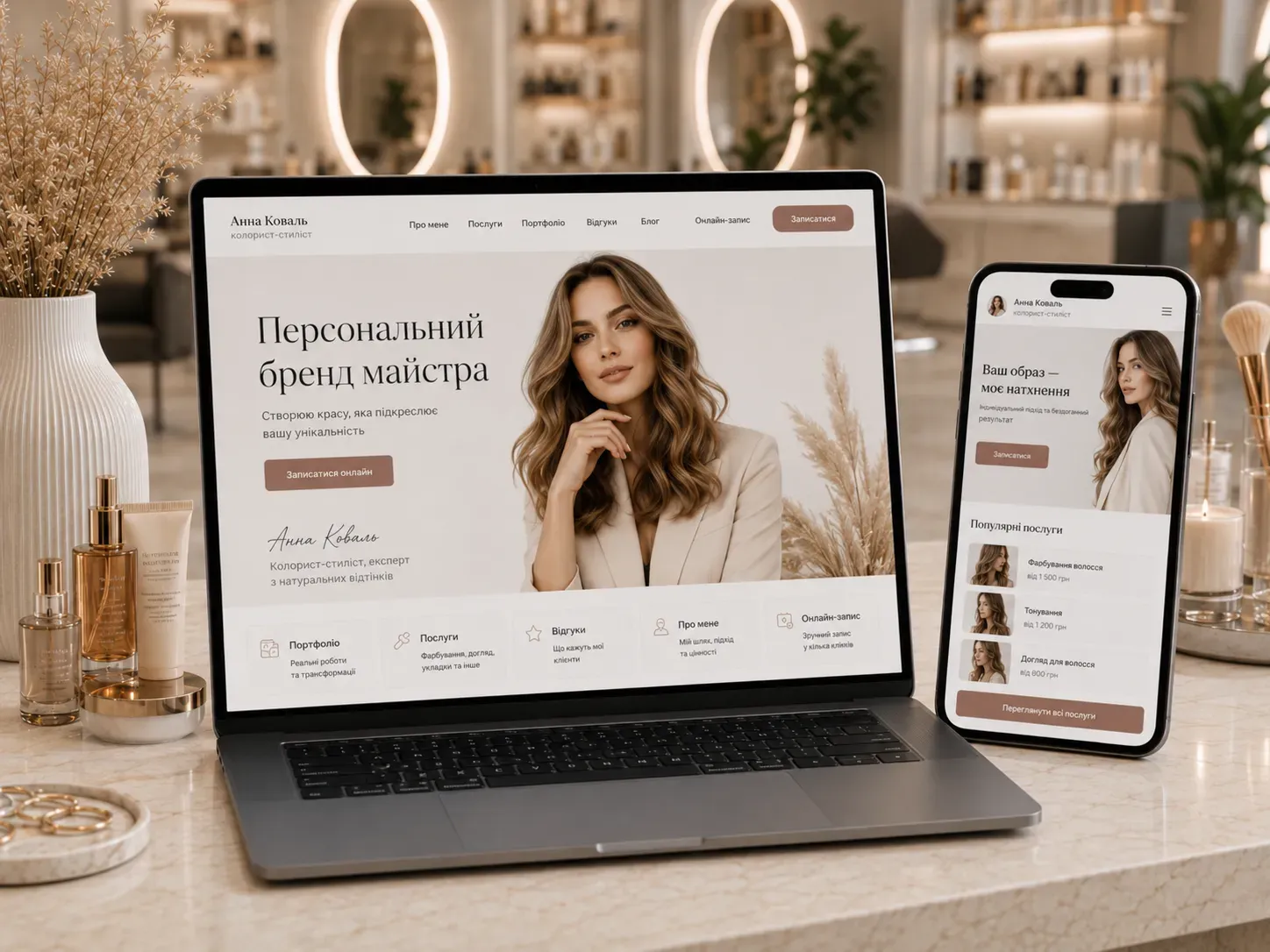
In the world of the beauty industry, competition for clients grows every day. Social media is flooded with offers, algorithms change, and organic reach declines. How do you stand out among hundreds of masters and create a steady stream of clients who choose you? The answer lies in building a personal brand through a professional website.
A personal website is not just a business card. It’s a digital hub where you control your image, communication, and sales. Unlike social media, a website works for you 24/7, is independent of algorithm changes, and allows you to fully manage interactions with clients. Let’s explore how exactly a website helps beauty masters attract more inquiries and increase the average bill.
Why a Beauty Salon Master Needs a Personal Website
1. Trust and Professional Image
Clients don’t just choose a service—they choose a master. A personal website is a place where you can showcase your expertise, experience, and unique approach. Unlike social media, where content quickly disappears in the feed, a website allows you to present information in a structured and professional manner.
- About You: Share your story, values, and philosophy of work. People love working with those they resonate with.
- Education and Certificates: Display your diplomas, course certificates, and participation in professional events. This builds trust and justifies the cost of your services.
- Photos and Videos of the Work Process: Visual content helps clients understand what to expect from the procedure.
2. A Portfolio That Sells
Your portfolio is your top salesperson. On a website, you can create a gallery of works that will work for you around the clock. Unlike Instagram, where photos quickly get lost, a website organizes your portfolio for the client’s convenience.
How to Make Your Portfolio Effective:
- Variety of Works: Show different styles and techniques so clients can find something “their own.”
- Before/After: Before-and-after photos are the most convincing argument for a potential client.
- Work Descriptions: Add a brief description of each work: techniques, materials, and execution time. This highlights your professionalism.
- Client Reviews: Place client reviews next to the photos of their work.
3. Expert Content: Become a Source of Knowledge
Content on your website isn’t just a way to attract clients through search engines—it’s also a chance to demonstrate your expertise. When you share useful tips, clients begin to see you as an authority in your field.
What Content Works for Beauty Masters:
- Blog: Articles on skincare, haircare, nail care; tips on choosing cosmetics; trends in the beauty industry.
- Client Advice: How to prepare for a procedure, how to care for the results, what to avoid.
- Video Tutorials: Short videos with tips, technique demonstrations, or answers to frequently asked questions.
- FAQ: A section with answers to common client questions. This saves your time and helps clients make decisions.
Expert content not only attracts new clients through SEO but also increases loyalty among existing ones. When clients see that you share valuable knowledge, they’re more likely to return to you and recommend you to friends.
4. Reviews and Social Proof
Reviews are one of the most powerful persuasion tools. Clients trust other clients’ opinions more than advertising. On your website, you can display reviews in a convenient format to make them work for you.
How to Effectively Use Reviews:
- Variety: Publish reviews from different clients with different types of problems or requests.
- Photo and Video Reviews: Real client photos with results or video reviews build more trust.
- Detailed Reviews: The more specific the review (e.g., “after lash lamination, my lashes became 30% thicker”), the more convincing it sounds.
- Social Media Integration: Add a review widget from Google, Facebook, or Instagram so they update automatically.
5. Online Booking: Convenience for Clients and Time Savings for You
Online booking is a feature that significantly simplifies life for both you and your clients. Instead of calling or messaging, clients can independently choose a convenient time and service through your website.
Benefits of Online Booking:
- Time Savings: Fewer calls and messages mean more time for working with clients.
- Fewer Missed Appointments: Automated reminders reduce the risk of clients forgetting their visit.
- Client Convenience: The ability to book at any time, even when you’re not available.
- Higher Conversion: Clients see available slots and can book immediately.
How to Implement Online Booking on Your Website:
- Calendar Integration: Connect Google Calendar or specialized booking services (e.g., Calendly, Setmore).
- Automated Reminders: Set up SMS or email notifications for clients about upcoming visits.
- Online Payment: Allow clients to pay for the service immediately upon booking to reduce no-shows.
- Ability to Change or Cancel Booking: This increases client loyalty.
6. Local SEO: How to Become the First in Search in Your City
If you work in a specific city or district, local SEO will help you attract clients searching for services in your area. Optimizing your website for local queries allows you to appear in the top of Google search results and on maps.
Steps for Effective Local SEO:
- Google My Business: Register your business in Google My Business. This will allow you to appear in the local search pack and on Google Maps.
- Geolocated Keywords: Use keywords with your city or district name (e.g., “hairdresser in Kyiv on Poznyaky,” “cosmetologist in Lviv”).
- Local Reviews: Encourage clients to leave reviews on Google and other platforms. The more reviews, the higher your rating.
- Content for Local Audience: Write articles about events in your city and collaborate with local bloggers or salons.
- NAP Consistency: Ensure your name, address, and phone number (NAP) are the same across all platforms.
7. Independence from Social Media: Why a Website Is Your Reliable Sales Channel
Social media is a powerful promotion tool, but it has a significant drawback: you don’t control the algorithms that determine who sees your content. Changes in rules, account blocks, or drops in reach can seriously damage your business.
A website is your own platform where you fully control the content, design, and functionality. It doesn’t depend on external factors and works for you regardless of changes in social media.
Benefits of Independence from Social Media:
- Stability: Your website is always available to clients, even if social media is down.
- Data Control: You collect client emails and phone numbers for future communication.
- Brand Image: A professional website elevates your brand’s status.
- Advertising Efficiency: A website allows you to run targeted ads with high conversion rates.
How to Create a Website for a Beauty Master: A Step-by-Step Plan
Step 1: Define Goals and Audience
Before creating a website, clearly define who it’s for and what tasks it should perform:
- Target Audience: Who are your clients? What are their needs and pain points?
- Website Goals: Attracting new clients, increasing the average bill, automating bookings, or all of the above?
- Unique Offer: What sets you apart from competitors? Why should clients choose you?
Step 2: Choose a Platform and Domain
Several options work for a beauty master’s website:
- Website Builders (Tilda, Wix, Squarespace): Easy to use but limited in functionality.
- CMS (WordPress): More flexible but requires technical knowledge or developer assistance.
- Custom Development: The most expensive option but allows for any functionality.
Tips for Choosing a Domain:
- Choose a short and memorable name (e.g.,
ivanova-beauty.com.ua). - Use a domain zone that matches your location (
.uafor Ukraine,.kiev.uafor Kyiv). - Avoid complicated and long names.
Step 3: Develop the Website Structure
The website structure should be intuitive for clients. Here’s a basic set of pages to include:
- Homepage: Briefly about you, your services, and advantages. An engaging banner with a “Book Now” button.
- About Me: Your story, education, certificates, and work philosophy.
- Services and Prices: A list of services with detailed descriptions and prices.
- Portfolio: A gallery of your works with descriptions and reviews.
- Reviews: Real client reviews with photos and videos.
- Blog: Useful articles for clients and SEO content.
- Contacts: Address, phone, email, map, and a contact form.
- Online Booking: A booking form with a calendar and payment option.
Step 4: Create Content That Sells
The content on your website should be not only informative but also persuasive. Here are some tips:
- Use Professional Photos: If you can’t hire a photographer, take high-quality photos with a good camera or smartphone.
- Write for the Client: Avoid professional jargon. Explain complex terms in simple words.
- Add Calls to Action: Every page should include a button or link for booking (“Book Now,” “Learn More”).
- Optimize for SEO: Use keywords naturally in texts, headings, and meta tags.
Step 5: Set Up Online Booking and Payment
Online booking is one of the most important features for a beauty master’s website. Here’s how to implement it:
- Choose a Booking Service: Calendly, Setmore, Acuity Scheduling, or integrate with your CRM.
- Set Up the Calendar: Specify available days and hours for booking.
- Add Services: A list of services with descriptions and durations.
- Automated Reminders: Set up SMS or email notifications for clients.
- Online Payment: Connect payment systems (LiqPay, Fondy, WayForPay) for prepayment.
Step 6: Optimize the Website for Search Engines
SEO optimization will help your website appear in the top of search results and attract organic traffic.
Key SEO Steps:
- Technical SEO: Ensure your website loads quickly, has a responsive design, and a secure connection (HTTPS).
- Content SEO: Use keywords in headings, texts, and meta tags.
- Local SEO: Register in Google My Business, add reviews, and optimize content for local queries.
- Backlinks: Get links to your website from authoritative sources (blogs, directories, social media).
Step 7: Promote the Website and Attract Clients
Creating a website is just the beginning. To make it effective, you need to promote it.
Promotion Strategies:
- Social Media: Share links to your website in your profiles and use social media to drive traffic.
- Email Marketing: Collect client emails and send them useful tips, promotions, and booking reminders.
- Contextual Advertising: Run ad campaigns in Google Ads or Facebook Ads to attract your target audience.
- Collaborate with Bloggers: Invite bloggers for free procedures in exchange for reviews or coverage.
- Promotions and Bonuses: Offer discounts for new clients or bonuses for referrals.
Conclusion: A Website Is an Investment in Your Brand
A personal website for a beauty master is not a luxury—it’s a necessity in today’s reality. It helps:
- Build trust and a professional image.
- Showcase your work and expertise.
- Automate bookings and reduce manual work.
- Attract clients through search engines and social media.
- Become independent of social media algorithm changes.
Investing in a professional website pays off quickly: you get more clients, increase the average bill, and create a stable sales channel. Start small—create a basic version of the website with a portfolio, services, and online booking. Later, add new features and content to make it an even more effective tool for your business.
Remember: your website is the face of your brand online. Make it professional, convenient, and persuasive, and clients will find their way to your salon on their own.
Create a Website That Works for You 24/7
We develop personal websites for beauty masters that help attract more clients, automate bookings, and increase the average bill. Order a consultation and find out how we can help your business.
FAQ
Do I need a personal website if I already have an Instagram?
Instagram is a powerful tool, but it doesn’t give you full control over your brand and client data. A website allows you to automate bookings, collect client contacts for future communications, and attract organic traffic through search engines. Moreover, a website works for you 24/7, even when you’re not posting on social media.
How much does it cost to create a website for a beauty master?
The cost of a website depends on its complexity and functionality. A basic business card website with a portfolio and booking form can be created on a website builder for $200–600 per year. A custom website with online booking, payment, and integrations costs from $1,000. The investment pays off through process automation and attracting new clients.
How do I attract clients to a new website?
Start by placing a link to your website in your social media profiles and email signatures. Run contextual ads in Google Ads or Facebook Ads to attract your target audience. Create useful blog content to improve search rankings. Offer clients bonuses or discounts for booking through the website.
Can I create a website myself?
Yes, if you have the time and desire to learn website builders (e.g., Tilda, Wix). However, for a professional website with unique design and complex functionality, it’s better to turn to specialists. This will save you time and avoid technical mistakes.
How do I optimize my website for local search?
Register in Google My Business so your salon appears on Google Maps. Use keywords with your city or district name in headings and website texts. Encourage clients to leave reviews on Google and other platforms. Create content that will interest local residents (e.g., articles about events in your city).