
How to Automate Reminders, No-Shows, and Membership Renewals in a Fitness Club: Complete Guide
Discover a concrete map of automated messages for fitness clubs: from booking confirmations to re-engaging inactive clients. Reduce no-shows, increase membership renewals, and enhance customer experience with CRM, SMS, email, Telegram, and push notifications.
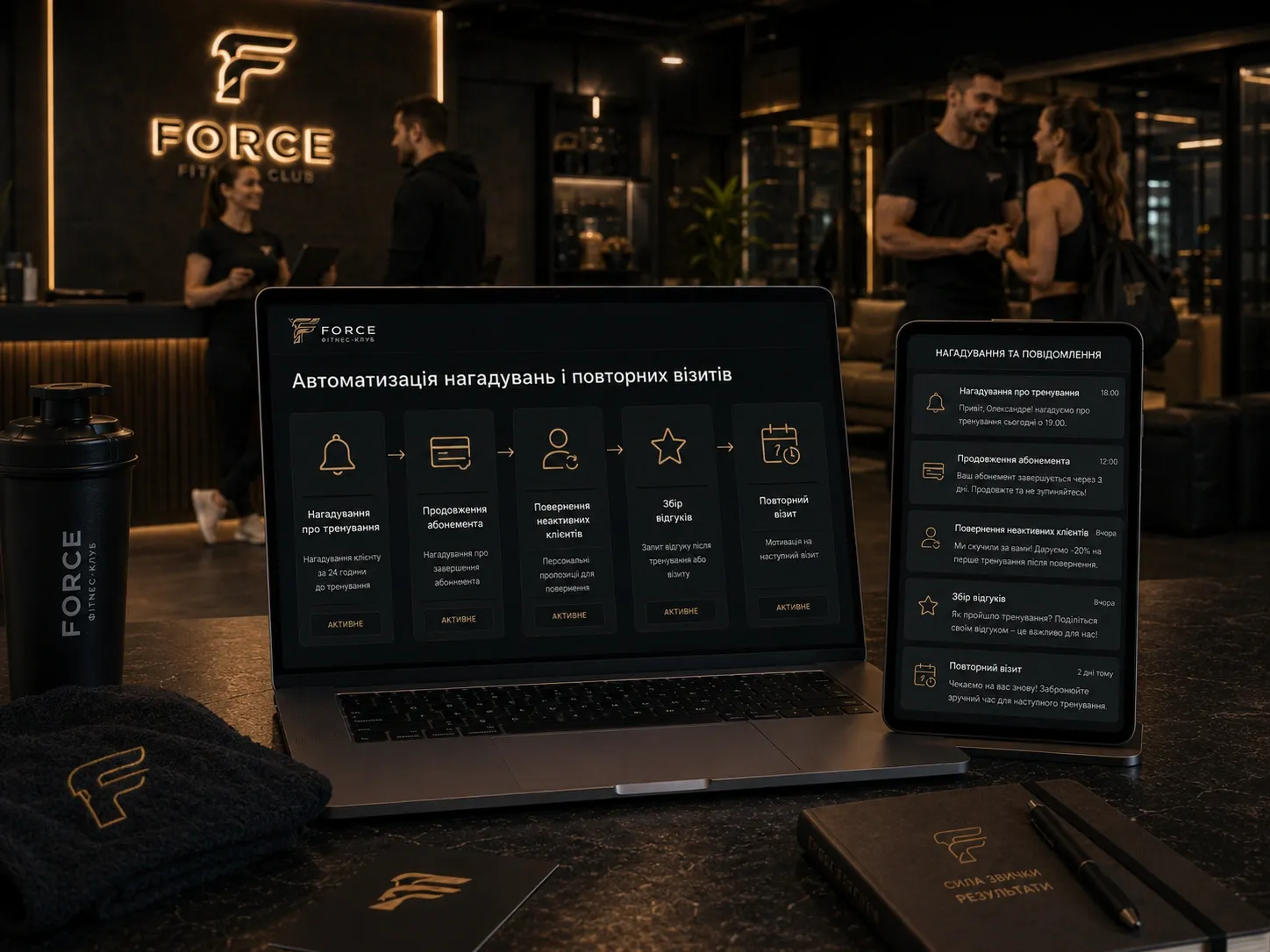
Why Automation Isn’t a Luxury—It’s a Necessity
Fitness clubs face the same challenges daily:
- Clients forget about scheduled workouts and don’t notify the club.
- Administrators manually call or message each no-show.
- Memberships expire, and clients don’t renew them because they didn’t receive reminders.
- Inactive clients disappear without feedback.
- Reviews are collected sporadically, leaving the club unaware of real issues.
The result? Lost revenue, inefficient staff, and frustrated clients. According to fitness industry research, up to 30% of clients miss workouts due to forgetfulness, and over 50% of memberships aren’t renewed due to lack of timely reminders. Manual reminders are no longer enough—you need a system that operates without constant supervision.
In this article, you’ll get a concrete map of automated messages with triggers, segments, and metrics to track effectiveness. This isn’t theoretical advice—it’s a practical action plan for fitness club owners, administrators, and marketers.
Step 1: Booking Confirmation
Why It Matters
Booking confirmations reduce no-shows by 15-25%. Clients receive a message immediately after booking and understand their spot is reserved.
How to Implement
- Trigger: The moment a client books a workout.
- Segment: All clients who booked a session.
- Channels: SMS, email, Telegram, or push notifications (depending on client preferences).
- Sending Time: Immediately after booking.
- Example Message:
"Welcome! You’re booked for Workout Name on Date, Time. Trainer: Trainer Name. We’ll see you in Hall Name. If your plans change—cancel via your personal account or call us."
Metrics to Track
- Confirmation Rate: Percentage of clients who received the message and didn’t cancel.
- Cancellation Frequency: How often clients cancel after confirmation.
Step 2: Workout Reminders (24 and 2 Hours Before)
Why It Matters
Most clients forget about workouts not because they don’t want to go, but because they’re busy. Two reminders (24 hours and 2 hours before) reduce no-shows by 30-40%.
How to Implement
-
Trigger: 24 hours and 2 hours before the workout.
-
Segment: Clients who haven’t canceled their booking.
-
Channels: SMS (highest open rate), Telegram (convenient for younger clients), email (for detailed info), push (if you have a mobile app).
-
Sending Time: Automatically scheduled.
-
Example Message (24 Hours Before):
"Reminder! Tomorrow at Time, you have Workout Name with trainer Trainer Name. Don’t forget to prepare! If you can’t make it—cancel to free up the spot."
-
Example Message (2 Hours Before):
"Workout Name starts in 2 hours! We’ll see you in Hall Name. Don’t be late—the first 10 minutes are the most important."
Metrics to Track
- No-Show Rate: Percentage of clients who missed the workout after reminders.
- Cancellation Time: When clients most often cancel (e.g., 2 hours before—signal to adjust the schedule).
Step 3: Reaction to No-Shows
Why It Matters
No-shows mean lost revenue and inefficient resource use. Automated reactions help:
- Bring clients back for the next workout.
- Understand the reason for no-shows (forgot, sick, dissatisfied).
- Prevent future no-shows.
How to Implement
- Trigger: 1 hour after the workout starts if the client didn’t show up.
- Segment: Clients who missed the workout and didn’t cancel.
- Channels: SMS, Telegram, or email (depending on client preferences).
- Sending Time: Automatically 1 hour after the workout starts.
- Example Message:
"We noticed you missed Workout Name. Is everything okay? If you need help with scheduling or plan to attend the next session—let us know! We’re always happy to adjust."
Metrics to Track
- Response Rate: Percentage of clients who replied to the message.
- No-Show Reasons: Analysis of responses (e.g., 20% forgot, 10% sick, 5% unhappy with the trainer).
Step 4: Membership Expiration Reminders
Why It Matters
Many clients renew memberships not because they don’t want to, but because they’re unaware their membership is expiring. Timely reminders increase renewal rates by 20-35%.
How to Implement
-
Trigger: 14, 7, and 3 days before membership expiration.
-
Segment: Clients with active memberships about to expire.
-
Channels: Email (for detailed info), SMS (for quick reminders), Telegram (for personalized offers).
-
Sending Time: Automatically scheduled.
-
Example Message (14 Days Before):
"Attention! Your Membership Name expires on Date. We’ve prepared a special renewal offer—check your personal account or ask the administrator."
-
Example Message (3 Days Before):
"Only 3 days left on your membership! Don’t lose access to workouts. Renew with a 10% discount—only until Date."
Metrics to Track
- Renewal Rate: Percentage of clients who renewed after reminders.
- Renewal Timing: When clients most often renew (e.g., 7 days before expiration).
Step 5: Membership Freeze Offers
Why It Matters
Sometimes clients don’t renew memberships due to temporary circumstances (vacation, injury). Freeze offers help retain clients and bring them back after a break.
How to Implement
- Trigger: 1 day after membership expiration if the client didn’t renew.
- Segment: Clients with recently expired memberships.
- Channels: Email, SMS, or Telegram.
- Sending Time: Automatically 1 day after expiration.
- Example Message:
"Your membership expired, but we know temporary breaks happen. Want to freeze your membership for a month? This lets you return without losing days. Details from the administrator."
Metrics to Track
- Freeze Rate: Percentage of clients who used the freeze offer.
- Return Time: How many days after freezing clients resume their memberships.
Step 6: Re-Engaging Inactive Clients
Why It Matters
Inactive clients are a potential revenue source. Automated campaigns can bring back 10-15% of clients who haven’t visited the club for over a month.
How to Implement
- Trigger: 30 days after the last visit.
- Segment: Clients who haven’t visited for over a month.
- Channels: Email (for detailed offers), SMS (for quick reminders), Telegram (for personalized messages).
- Sending Time: Automatically 30 days after the last visit.
- Example Message:
"We miss you! Do you miss our workouts? Come for a free first session—we’ve prepared a special program. Book via Link."
Metrics to Track
- Re-Engagement Rate: Percentage of clients who returned after the campaign.
- Inactivity Duration: Average inactivity period before returning.
Step 7: Collecting Feedback and Improving Services
Why It Matters
Feedback helps understand what clients like and what needs improvement. Automated feedback collection increases response rates 2-3x compared to manual methods.
How to Implement
- Trigger: 1 hour after the workout.
- Segment: All clients who attended the workout.
- Channels: Email (for detailed feedback), SMS (for quick ratings), Telegram (for convenience).
- Sending Time: Automatically 1 hour after the workout.
- Example Message:
"Thanks for attending our workout! How did you like the session? Rate it from 1 to 5 ⭐️. Your opinion matters! Feedback Form Link."
Metrics to Track
- Feedback Rate: Percentage of clients who responded.
- Average Rating: Overall client satisfaction.
- Problem Areas: Analysis of negative feedback (e.g., dissatisfaction with trainers or cleanliness).
Step 8: Personalized Offers and Cross-Selling
Why It Matters
Personalized offers increase the average check by 15-25%. For example, clients who attend yoga can be offered a Pilates membership or personal training.
How to Implement
- Trigger: After analyzing the client’s visit history.
- Segment: Clients with specific preferences (e.g., strength training or group classes).
- Channels: Email (for detailed offers), Telegram (for quick messages).
- Sending Time: Automatically after data analysis.
- Example Message:
"We noticed you like strength training! Want to try a personal session with trainer Trainer Name? First session with a 20% discount—just for you. Book via Link."
Metrics to Track
- Offer Acceptance Rate: Percentage of clients who took the offer.
- Average Check Increase: How the average check changed after implementing personalized offers.
Choosing Communication Channels: SMS, Email, Telegram, Push
| Channel | Advantages | Disadvantages | When to Use |
|---|---|---|---|
| SMS | High open rate (95%), quick perception | Limited characters, cost | Workout reminders, urgent messages, booking confirmations |
| Detailed info, buttons, free | Lower open rate (20-30%), may go to spam | Membership expiration reminders, feedback collection, personalized offers | |
| Telegram | Convenient for clients, bot automation, free | Requires client subscription to the bot | Reminders, personalized offers, feedback collection |
| Push | Instant notifications, high open rate | Requires a mobile app | Urgent reminders (2 hours before workout), booking confirmations |
How to Choose a CRM for Automation
Not all CRMs are suitable for fitness clubs. Here are key criteria:
- Integration with Booking System: CRM should automatically pull booking data.
- Client Segmentation: Ability to group clients (e.g., by membership type, visit frequency).
- Automated Triggers: Configuring messages based on schedule or events (e.g., 24 hours before a workout).
- Multichannel Support: SMS, email, Telegram, and push notifications in one system.
- Analytics: Track campaign effectiveness (open rates, clicks, responses).
- Personalization: Use client names, workout details, dates, and other data in messages.
- Payment System Integration: Automatically track membership payments.
Examples of CRMs for Fitness Clubs
- Mindbody: Specialized fitness CRM with booking and automation modules.
- Glofox: Suitable for small and medium clubs, includes marketing tools.
- 1C:Fitness: Designed for the Ukrainian market, integrates with accounting systems.
- Custom Solutions: If standard CRMs don’t fit, develop a custom system with SwiftyFlux that meets all your club’s needs.
Step-by-Step Automation Implementation Plan
- Audit Current Processes: Identify which reminders are already used and which metrics are tracked.
- Choose a CRM: Select a system that meets the criteria above.
- Set Up Triggers: Define key events for automated messages (e.g., booking, membership expiration).
- Segment Clients: Divide clients into groups based on behavior (e.g., active, inactive, new).
- Create Templates: Develop texts for each message type.
- Test: Launch automation on a small client group and track results.
- Scale: Gradually implement automation for all clients.
- Monitor and Optimize: Regularly analyze metrics and adjust campaigns.
Conclusion: Automation Isn’t Complicated
Automating reminders, no-shows, and membership renewals in a fitness club isn’t difficult if approached systematically. Using a CRM, you can:
- Reduce no-shows by 30-40%.
- Increase membership renewal rates by 20-35%.
- Bring back 10-15% of inactive clients.
- Improve client experience with personalized messages.
Start small: automate booking confirmations and workout reminders first, then gradually add new triggers. Use data to analyze effectiveness and continuously optimize processes. The results won’t keep you waiting: more satisfied clients, less manual work, and higher club revenue.
If you don’t know where to start, contact SwiftyFlux experts—we’ll help choose and implement a CRM tailored to your fitness club.
Need a CRM for Your Fitness Club?
SwiftyFlux will help you choose and implement a CRM that automates reminders, no-shows, membership renewals, and client re-engagement. Get an all-in-one system for managing your club without manual work.
FAQ
Which communication channels are most effective for fitness club reminders?
The most effective channels are SMS (for urgent reminders), email (for detailed information), and Telegram (for client convenience). Push notifications are also useful if the club has a mobile app. The choice depends on the target audience and message type.
How often should workout reminders be sent?
The optimal frequency is two reminders: 24 hours and 2 hours before the workout. This reduces no-shows by 30-40%. An additional reminder a day before may also be helpful for clients with busy schedules.
How can feedback collection after workouts be automated?
Use automated triggers in your CRM: send clients an SMS, email, or Telegram message 1 hour after the workout asking them to rate the session. Include a feedback form link for convenience. This increases feedback rates 2-3x compared to manual collection.
How can inactive fitness club clients be re-engaged?
Use automated campaigns for clients who haven’t visited in over a month. Send them personalized offers (e.g., a free workout or discount). Analyze visit history to suggest relevant options for each client.
Which CRM should be chosen for automating fitness club processes?
Choose a CRM that integrates with your booking system, supports multichannel communication (SMS, email, Telegram, push), and has flexible trigger settings. For fitness clubs, Mindbody, Glofox, 1C:Fitness, or custom solutions from SwiftyFlux (tailored to your business) are suitable.
How can the number of workout no-shows be reduced?
Combine booking confirmations, reminders 24 and 2 hours before workouts, and reactions to no-shows. Automate these processes with a CRM to reduce no-shows by 30-40%. Also, analyze cancellation times to optimize the schedule.