
Corporate Website for Hotel Chains: Locations, Rooms, and Unified Booking
How to create a corporate website for a hotel chain that supports a unified brand, promotes each location in local search, and ensures direct bookings through integrated CRM/PMS. Practical recommendations for hotel chain owners and management companies.
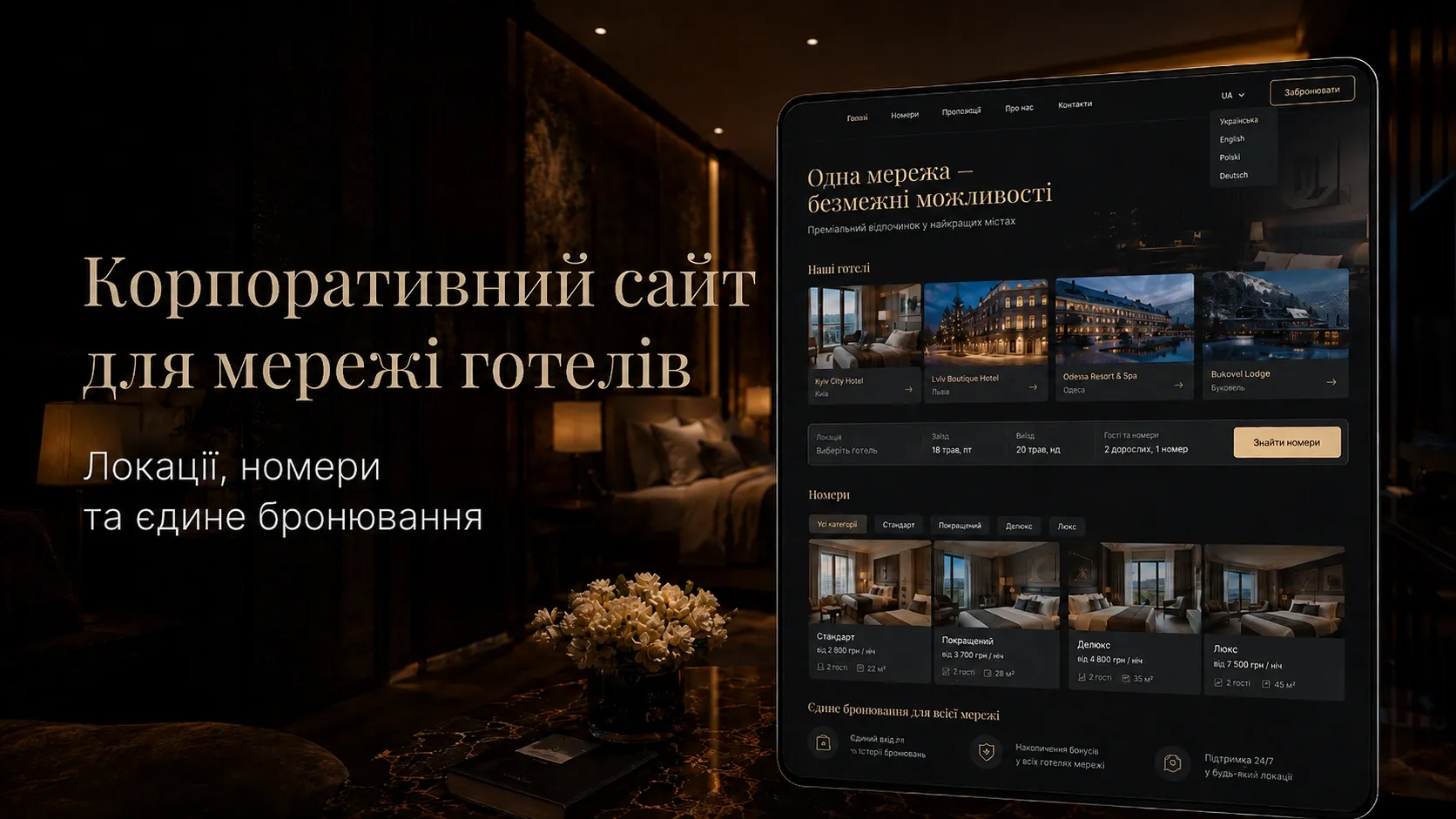
In the hotel business, a corporate website is not just a business card. It’s a central hub that must simultaneously:
- Support a unified brand for the chain.
- Promote each location in local search.
- Ensure direct bookings without intermediaries.
- Integrate with CRM/PMS for managing rooms, rates, and analytics.
If your website fails to perform these tasks, you lose customers who search for hotels in specific cities but find competitors instead. And every booking through Booking.com or Expedia means a commission of 15% to 30%. Even with 20 locations and 100 rooms, losses can amount to hundreds of thousands of dollars annually.
This article explains how to build the architecture of a corporate website for a hotel chain so it functions as a unified sales mechanism rather than a collection of separate pages.
Website Architecture for Hotel Chains: Key Components
A corporate website for a hotel chain must be modular and scalable. The main components are:
- Homepage — presents the chain’s brand, key advantages, and quick access to locations.
- Location Pages — separate pages for each hotel with local SEO and information about rooms, conditions, and services.
- Booking System — a unified engine for searching rooms, filtering, and payment.
- Room Catalog — a dynamic section with descriptions, photos, prices, and availability.
- Multilingual Support — website versions for different markets and language groups.
- CRM/PMS Integration — synchronization of booking, customer, and financial data.
- Analytics and Reports — monitoring conversions, traffic sources, and user behavior.
Let’s explore each component in detail.
Homepage: Balancing Brand and Local Sales
The homepage of a corporate hotel chain website must perform two functions:
- Position the brand — communicate the chain’s philosophy, quality standards, and unique advantages.
- Direct traffic to locations — help users quickly find the right hotel in a specific city.
How to implement this:
- Search banner — a field for selecting a city, check-in/check-out dates, and number of guests. This should be the first element a user sees.
- Interactive map of locations — a map with hotel markers. Clicking a marker leads to the location page.
- Top locations blocks — highlight 3-5 most popular hotels with photos, brief descriptions, and a “Book Now” button.
- Social proof — guest reviews, ratings on booking platforms, quality certificates.
- Brief brand description — why choose your chain (e.g., “All hotels in city centers,” “Free airport transfer,” “Cleanliness standards per WHO protocol”).
Example: If you have an aparthotel chain under the brand “CityStay,” the homepage should show that these are modern accommodations with kitchens and laundry, ideal for long business trips or family vacations. At the same time, the user should immediately see in which cities your apartments are available.
Location Pages: Local SEO and Conversion
Each hotel in the chain should have a separate page optimized for local search. This is critical because when a user searches for “hotel in Lviv near the Opera House,” they’re not specifically looking for your brand—they’re looking for options in a particular area.
Structure of a location page:
- H1 heading — includes the hotel name and keywords, e.g., “CityStay Hotel Lviv — rooms near the Opera House with free breakfast.”
- SEO description — a brief text under the heading with keywords and unique advantages of the location.
- Booking banner — a field for selecting dates and number of guests with a “Book Now” button.
- Photos and videos — high-quality images of rooms, common areas, restaurants, and surroundings. A video tour of the hotel builds trust.
- Location description — where the hotel is situated, how to get there from the airport/train station, and nearby attractions (museums, shopping centers, business hubs).
- Room types — a catalog with descriptions, photos, prices, and a “Book Now” button.
- Services and amenities — a list of what’s available at the hotel (Wi-Fi, parking, conference hall, gym, etc.).
- Guest reviews — integration with Google Reviews or TripAdvisor, or a dedicated reviews block.
- FAQ — answers to common questions (e.g., “Are pets allowed?”, “How far is it from the city center?”).
- Local keywords — optimize the text for queries like “hotel in [city] with parking,” “business hotel in [city],” “apartments for long-term stay in [city].”
Local SEO:
- Create separate pages for each city where your hotels are located. For example,
/hotels/lviv,/hotels/kyiv,/hotels/odesa. These pages should display all hotels in the respective city. - Use
LocalBusinessschema markup for each location so Google better understands address, phone, hours, and reviews. - Register each hotel in Google My Business with consistent data (name, address, phone) to improve visibility in local search.
- Collect reviews on Google and other platforms and respond to them—this boosts search rankings.
Example: If you have a hotel in Kyiv on Khreshchatyk Street, the location page should include:
- Mention of proximity to Maidan Nezalezhnosti, TSUM, and metro stations.
- Information on how to get there from Boryspil Airport or Kyiv Railway Station.
- Photos of rooms with views of the street.
- Guest reviews about the convenience of the location.
Unified Booking: How to Combine All Locations in One Engine
The booking system is the heart of a corporate hotel chain website. It must:
- Be unified for all locations.
- Support dynamic pricing (rates depending on season, city events, length of stay).
- Integrate with CRM/PMS to synchronize booking, customer, and payment data.
- Offer flexible filtering for users.
- Support multiple languages and currencies.
- Work quickly and error-free.
How to implement this:
-
Search filters:
- City/location.
- Check-in/check-out dates.
- Number of adults and children.
- Room type (standard, suite, apartments, etc.).
- Price range.
- Amenities (Wi-Fi, parking, pool, etc.).
- Hotel rating.
-
Dynamic room catalog:
- On the search results page, display rooms with photos, brief descriptions, and prices.
- Add sorting options by price, rating, or popularity.
- Show real-time availability (e.g., “Only 2 rooms left”).
-
Booking process:
- Step 1: Select room and dates.
- Step 2: Enter guest details (name, phone, email).
- Step 3: Additional services (breakfast, transfer, excursions).
- Step 4: Confirmation and payment.
-
Payment:
- Integration with payment systems (LiqPay, Fondy, Stripe, PayPal).
- Option to pay online or upon check-in.
- Automatic sending of booking confirmation via email and SMS.
-
Personal account:
- Booking history.
- Ability to modify or cancel a booking.
- Loyalty program (discounts, bonuses).
CRM/PMS Integration:
- All bookings from the website must automatically sync with the PMS to avoid double bookings and conflicts.
- Customer data (name, contacts, booking history) must be stored in the CRM for future communication.
- Rates and room availability must sync between the website and PMS in real time.
- Website analytics (traffic sources, conversions, popular rooms) must integrate with the CRM for decision-making.
Example: If you have a chain of 10 hotels in 5 cities, the booking system should allow a user to:
- Select a city (e.g., Odesa).
- Choose dates of stay.
- Filter rooms by price and amenities.
- Book a room at a hotel near the sea with parking.
- Pay online.
- Receive confirmation via email.
Room Catalog: How to Showcase Inventory Without Confusing the Customer
The room catalog must be user-friendly and informative. Users should quickly find a room that meets their needs and budget.
Catalog structure:
- Photos — several images for each room type (bedroom, bathroom, view from the window, common area).
- Room type name — e.g., “Standard Double,” “Suite with Terrace,” “Family Apartments.”
- Brief description — area, number of sleeping places, key amenities.
- Detailed description — full list of amenities, services, and conditions.
- Price — cost per night or for the entire stay.
- Availability — a calendar with free/occupied dates.
- “Book Now” button — bright and noticeable.
Catalog filters:
- Number of sleeping places.
- Price range.
- Amenities (e.g., air conditioning, kitchenette, safe).
- View from the window (city, sea, courtyard).
- Floor level.
Dynamic pricing:
- Prices should change depending on season, city events (festivals, conferences), and length of stay.
- Implement a discount system for returning customers or long-term bookings.
Example: If you have an aparthotel, the catalog might include:
- “Studio for One” — 25 m², kitchen, washing machine.
- “Two-Bedroom Apartments” — 50 m², two bedrooms, living room with sofa.
- “Suite with Terrace” — 70 m², panoramic city view, jacuzzi.
Multilingual Support: How to Adapt the Website for Different Markets
If your hotel chain operates in multiple markets, the website must support several languages and currencies. This is not just about user convenience but also an opportunity to improve SEO for each market separately.
How to implement multilingual support:
-
Language selection:
- Add a language switcher to the website header.
- Save language preferences in cookies so users don’t have to select a language every time.
-
Content translation:
- All website texts must be professionally translated (no machine translation).
- Pay special attention to room descriptions, services, and location details.
- Reviews can be left in the original language but with translations added.
-
Currency localization:
- Prices should display in the user’s currency (UAH, EUR, USD, etc.).
- Add an option to manually change the currency.
-
SEO localization:
- Create separate URLs for each language (e.g.,
/en/hotels/lviv,/de/hotels/lviv). - Optimize meta tags (title, description) for each language.
- Use keywords popular in specific markets (e.g., in Germany, users might search for “Hotel Ukraine Kiev,” while in Ukraine, they search for “готель Київ центр”).
- Create separate URLs for each language (e.g.,
-
Booking localization:
- The booking system must support multiple languages.
- Payment systems must work with local currencies.
- Booking confirmations must be sent in the user’s language.
Example: If your chain operates in Ukraine and Poland, the website should have:
- A Ukrainian version for local customers.
- A Polish version for Polish tourists.
- An English version for international guests.
- Payment options in UAH, PLN, and EUR.
CRM/PMS Integration: How to Sync Data and Automate Processes
CRM (Customer Relationship Management) and PMS (Property Management System) are tools that help manage bookings, customers, rooms, and finances. Integrating the website with these systems is critical for the efficient operation of a hotel chain.
What needs to be synchronized:
-
Bookings:
- All bookings from the website must automatically sync with the PMS.
- Avoid double bookings and conflicts.
- Allow users to modify or cancel bookings via their personal account on the website.
-
Customers:
- Customer data (name, contacts, booking history) must be stored in the CRM.
- Segment customers (e.g., “returning customers,” “corporate clients,” “tourists”).
- Send automated emails (booking confirmations, check-in reminders, discount offers).
-
Rooms and Rates:
- Room availability must sync between the website and PMS in real time.
- Rates must update automatically based on season or events.
- Block rooms for maintenance or technical service.
-
Finances:
- Payment statuses must sync between the website and CRM.
- Generate reports on revenue, refunds, and commissions.
-
Analytics:
- Website traffic, conversion, and user behavior data must integrate with the CRM.
- Track which locations and rooms are most popular.
- Analyze traffic sources (organic search, ads, social media).
CRM/PMS Solutions for Hotel Chains:
- Cloudbeds — a popular solution for hotels and hostels with integration for websites and booking channels.
- HotelTime — a Ukrainian PMS that supports many hotel chains.
- Oracle Hospitality — a corporate solution for large hotel chains.
- 1C:Hotel — a solution for medium and large hotels based on the 1C platform.
Integration Example:
- A user books a room on the website.
- Booking information automatically syncs with the PMS.
- The PMS blocks the room for the selected dates.
- Customer data is stored in the CRM.
- The user receives a confirmation via email and SMS.
- Upon check-in, the reception sees the booking in the PMS and provides the keys.
Analytics and Optimization: How to Improve Website Conversion
A corporate website for a hotel chain must not only sell but also collect data to improve conversion. Use analytics to understand:
- Which sources drive traffic.
- Which pages have the highest conversion and which have the highest bounce rate.
- Which locations and rooms are most popular.
- Where users drop off during the booking process.
Analytics Tools:
- Google Analytics 4 — track traffic, user behavior, and conversions.
- Google Tag Manager — manage tags for tracking events (e.g., clicks on the “Book Now” button).
- Hotjar — heatmaps and session recordings to understand how users interact with pages.
- Built-in CRM/PMS Analytics — reports on bookings, customers, and finances.
What to Analyze and How to Optimize:
| Metric | How to Analyze | How to Improve |
|---|---|---|
| Website Traffic | Google Analytics: traffic sources (organic search, ads, social media, direct visits). | Invest in channels with the highest conversion. Optimize SEO for organic traffic. |
| Booking Conversion | Google Analytics and CRM: ratio of website visitors to bookings. | Simplify the booking process. Add more photos and reviews. Offer discounts for quick booking. |
| Bounce Rate | Google Analytics: percentage of users who leave after viewing one page. | Improve page load speed. Make the design more intuitive. Add clear calls to action. |
| Popular Locations | CRM/PMS: which hotels have the most bookings. | Focus marketing efforts on top locations. Improve pages for less popular hotels. |
| Popular Rooms | CRM/PMS: which room types are booked most often. | Increase the number of popular rooms. Add more photos and descriptions for less popular ones. |
| Booking Sources | CRM: which channels (website, Booking, Expedia) generate bookings. | Reduce commissions by increasing direct bookings through the website. Offer discounts for bookings on the website. |
| Booking Process | Hotjar: where users drop off during booking. | Simplify the booking form. Reduce the number of steps. Add a progress indicator. |
Optimization Example:
- Analytics shows that 60% of users leave the website on the room selection page.
- You conduct A/B testing and find that adding a “Price: Low to High” filter increases conversion by 15%.
- You also add more room photos and reviews, which reduces the bounce rate by 10%.
Conclusion: A Corporate Website as a Unified Sales Mechanism
A corporate website for a hotel chain is not just a set of pages but a complex system that must:
- Support a unified brand while promoting each location in local search.
- Ensure direct bookings without intermediaries.
- Integrate with CRM/PMS for process automation.
- Collect data for analytics and conversion optimization.
If your website fails to perform these tasks, you lose customers and revenue. For example:
- If a user searches for “hotel in Kharkiv with parking” and doesn’t find your location in search, they’ll go to a competitor.
- If the booking system isn’t integrated with the PMS, double bookings can occur.
- If the website doesn’t support multiple languages, you lose foreign tourists.
Creating a corporate website for a hotel chain is an investment that pays off through increased direct bookings and reduced intermediary commissions. The key is to approach this systematically and implement all critical components: website architecture, local SEO, booking system, multilingual support, and CRM/PMS integration.
Need a corporate website for your hotel chain?
We develop corporate websites for hotel chains with CRM/PMS integration, booking systems, and local SEO. We ensure a unified brand, direct sales, and process automation. Contact us to discuss your project.
FAQ
Why is a corporate website for a hotel chain better than separate websites for each location?
A corporate website supports a unified brand, simplifies content management and CRM/PMS integration, and allows promoting all locations in one place. Separate websites require more resources for maintenance and SEO and don’t provide synergy between locations.
How to optimize location pages for local SEO?
Use keywords with the city name, add LocalBusiness schema markup, register the hotel in Google My Business, collect reviews, and optimize content for popular local queries (e.g., “hotel in Kyiv near Khreshchatyk”).
Which CRM/PMS to choose for a hotel chain?
It depends on the chain’s size and needs. For small chains, HotelTime or Cloudbeds may suffice. For large corporate chains, consider Oracle Hospitality or 1C:Hotel with custom integration.
How to reduce commissions for bookings through intermediaries?
Invest in direct traffic to the website through SEO and advertising, offer discounts for bookings on the website, improve the user experience, and integrate the booking system with CRM/PMS for process automation.
Is multilingual support necessary for a hotel chain website?
If your chain operates in multiple markets or hosts international tourists, multilingual support is essential. It improves user experience and SEO for each market separately.
How to analyze the effectiveness of a corporate hotel chain website?
Use Google Analytics to track traffic and conversions, Hotjar to analyze user behavior, and built-in CRM/PMS analytics for booking and financial reports. Analyze traffic sources, bounce rates, and booking conversions.