
Corporate Website for a Beauty Salon Network: Structure, Features, and Online Booking
How to create a corporate website for a beauty salon network to unify your brand and branches, improve local SEO, and automate online bookings. A practical guide with CRM integration, multilingual support, and franchising functionality.
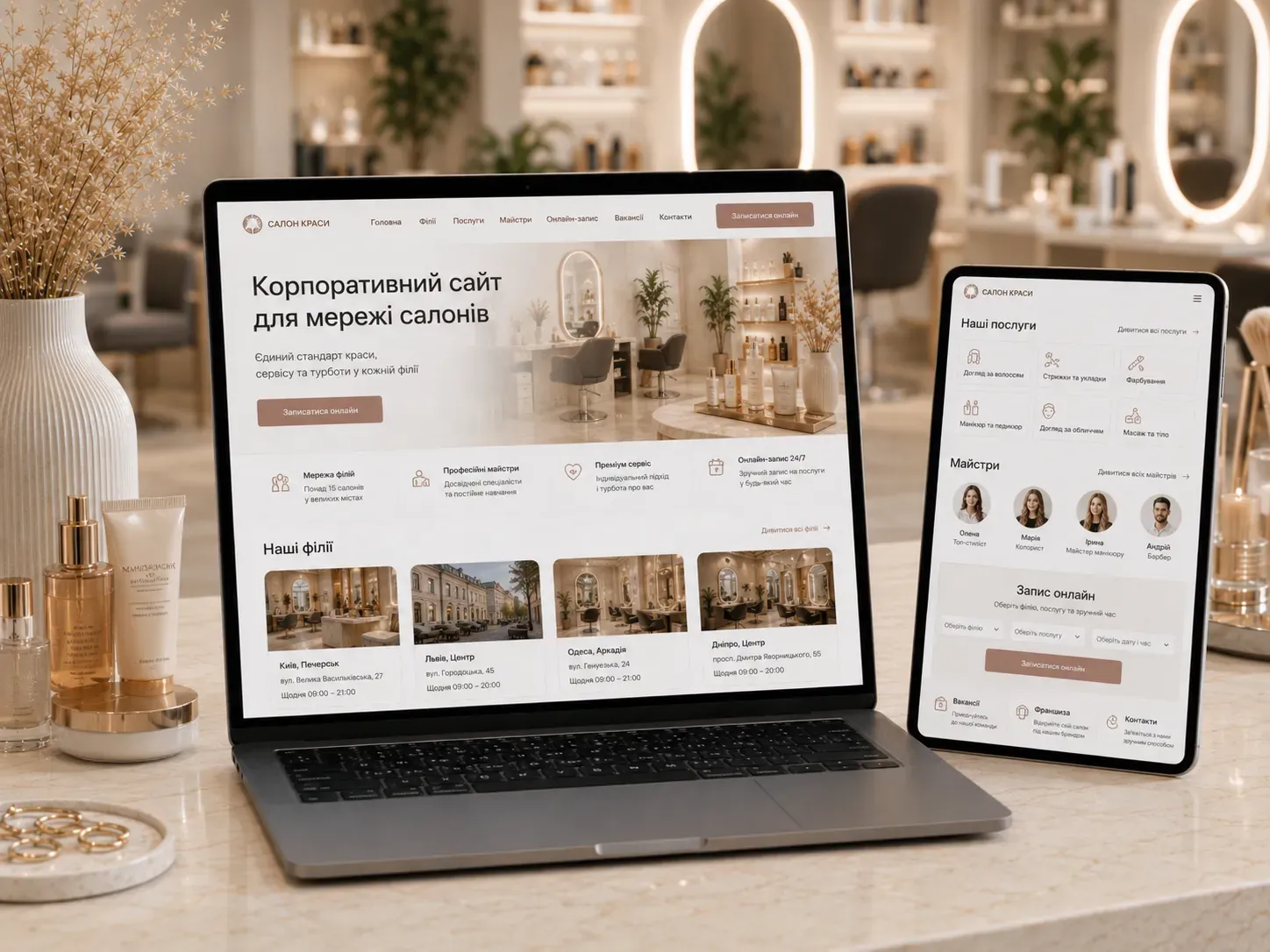
In a beauty salon network, each location operates as a separate business, but customers perceive the brand as a single entity. Without a corporate website with a centralized structure, you risk:
- Losing clients due to a complicated choice of salon by location or service.
- Wasting the budget on separate landing pages for each branch that don’t interact with each other.
- Missing local leads due to weak SEO at the individual address level.
- Complicating online bookings because clients can’t see the available slots of all network masters.
- Losing control over a unified service standard due to the lack of a shared CRM.
Let’s explore how to build a multi-page corporate website that solves these problems and turns visitors into loyal customers for each salon.
Structure of a Corporate Website for a Beauty Salon Network
1. Homepage: Brand Unity and Easy Selection
The homepage is the showcase of your entire network, not just a single branch. Its tasks are:
- Show your geographic presence. An interactive map with all salons or a dropdown list of cities/districts for quick navigation to the local page.
- Highlight the network’s key advantages. For example: “All masters are certified,” “Tool sterilization according to ISO standards,” “Online booking in 30 seconds.”
- Emphasize brand uniqueness. Photo studio of the network, salon tour videos, customer reviews from different locations.
- Direct traffic to conversions. Buttons like “Choose a salon,” “Book online,” and “View services” lead to the relevant sections.
Example of the “Choose a Salon” block structure:
- By city (Kyiv, Lviv, Odesa…)
- By district (Podil, Pechersk, Troieshchyna…)
- By service (manicure, hairdressing, SPA…)
- By master (popular specialists in the network)
Why is this important? The client sees the entire network, not just one location, and quickly selects a salon based on their criteria.
2. Branch Pages: Local SEO and Client Details
Each branch needs its own page with unique content for local search promotion. Key elements:
| Page Element | Purpose | Example Content |
|---|---|---|
| Title and URL | Includes city/district and salon name | beauty-salon-kyiv-podil |
| Meta Tags | Attract clicks in local search | “Beauty salon in Podil — manicure, hairdressing, massage. Online booking, address, and photos” |
| Address and Contacts | Precise location for Google Maps and clients | Street, building, floor, public transport stops, parking |
| Working Hours | Operating hours with weekends highlighted | Mon–Fri: 9:00 AM–9:00 PM, Sat–Sun: 10:00 AM–8:00 PM |
| Salon Photos | Visual overview of the interior and work zones | Reception area, hairdressing chairs, massage room, SPA bathroom |
| Local Reviews | Social proof for clients from the area | Reviews from Google, Facebook, integrated via API |
| Branch Services | Catalog of available services with prices | Manicure (from 300 UAH), Hairdressing (from 500 UAH) |
| Salon Masters | Employee profiles with photos and specializations | Name, photo, experience, certifications, client reviews |
| Online Booking | Integration with the salon’s calendar | Select service → master → date/time → booking |
| Local Keywords | SEO optimization for “beauty salon + district” searches | “Best beauty salon in Vynohradar,” “Hairdresser near Lukianivska metro station” |
Pro Tip: Add a “How to Get Here” block with an interactive map and instructions for cars and public transport. This improves behavioral factors and SEO.
3. Unified Service Catalog for the Network
The service catalog is a central element that reduces the load on operators and simplifies client choices. Its features:
- Unified service database with filtering. A client selects a service (e.g., “Keratin straightening”), sees all network salons where it’s available, and proceeds directly to online booking.
- Flexible category system. Sections by service type (hair, nails, face, body) and subcategories (e.g., “Nails → Gel polish → Design”).
- Service description and duration. Detailed text with benefits, contraindications, and session length helps clients understand what they’re booking.
- Prices and promotional offers. Ability to specify base prices and package options (e.g., “Hairdressing + makeup with a 15% discount”).
- Before/after photos. A gallery showcasing the results.
Example Catalog Structure:
- Hair
- Haircuts and styling
- Coloring
- Care procedures
- Extensions and wigs
- Nails
- Manicure
- Pedicure
- Extensions
- Face
- Cleansing and care
- Makeup
- Brows and lashes
- Body
- Epilation
- Massage
- SPA procedures
Why does this work? Clients see the full range of network services, not just those available at the nearest salon. This increases the average check and loyalty.
4. Master Profiles: Personal Branding and Online Booking
Clients often choose not a salon but a specific master. Therefore, the section with employee profiles is a powerful tool for attracting and retaining customers.
What a master’s profile should include:
- Photo (professional, well-lit).
- Name and position (e.g., “Anna Petrenko, nail service master”).
- Work experience and certifications (with the option to view document photos).
- Specialization (e.g., “Gel polish, hardware manicure, design”).
- Master’s works (before/after gallery).
- Client reviews (linked to services).
- Work schedule and “Book with the master” button.
- Links to social media (Instagram, TikTok).
Online Booking Integration: A client selects a master → sees their available slots for the next few days → books a service → receives confirmation via email/SMS and a reminder a day before the visit.
Important: Synchronize the calendars of all network masters to avoid double bookings.
5. Local SEO: How to Get Leads from Google and Maps
Without local SEO, your salons won’t be visible to clients searching for “nearby” services. Key steps:
- Google Business Profile for each branch. Create a separate profile for each salon with the correct address, working hours, photos, and service categories. Update the information regularly.
- Local keywords. Optimize branch pages for queries like:
- “Beauty salon in [district]”
- “Hairdresser near [landmark]”
- “Manicure [district] [city]”
- “Best massage in [district]”
- NAP consistency. Ensure that the name, address, and phone number (NAP) are identical across all platforms: website, Google Maps, social media, directories.
- Local reviews. Encourage clients to leave reviews on Google and other platforms. Respond to all comments—this improves reputation and search rankings.
- Schema.org markup. Add microdata to branch pages with address, working hours, services, and prices. This helps search engines better understand the content.
- Local content. Create blog articles on topics relevant to each district:
- “Best beauty salons on Kyiv’s Left Bank”
- “Where to get bridal makeup in Lviv”
- “SPA in Odesa: Review of salons with hammams”
Tip: Use Google Search Console and Google Analytics to track local search traffic and adjust your strategy.
6. Franchise Section: How to Attract Partners and Scale the Business
If you plan to develop a franchise, a dedicated section on the website will help attract partners and standardize business processes.
What should be in the “Franchise” section:
- Franchise presentation. A brief description of the brand, development history, number of branches, and unique advantages.
- Collaboration model. Description of the franchising model: franchise fee, royalties, requirements for premises, equipment, and staff.
- Benefits for franchisees. For example:
- Ready-to-use brand with recognition
- Staff and administrator training
- Supply of materials and equipment
- Marketing support
- Access to centralized CRM
- Partner requirements. Minimum requirements for premises, investments, and experience in the beauty industry.
- Success stories. Photos of partner salons, their development stories, and owner testimonials.
- Franchise application form. A questionnaire with fields for contact details, experience, financial capabilities, and location.
- FAQ for potential franchisees. Answers to typical questions about launch timelines, payback, and legal aspects.
Why does this work? The “Franchise” section filters applications and attracts serious partners ready to adhere to brand standards.
7. Careers Section: How to Attract Talented Masters
Quality employees are the key to a network’s success. The “Careers” section on the corporate website helps attract the best specialists and reduce staff turnover.
Section structure:
- About working in the network. A brief description of the corporate culture and employee benefits (e.g., stable salary, training, career growth).
- Current vacancies. A list of open positions with filtering by city and specialization.
- Job descriptions. For each position:
- Position and city
- Responsibilities and requirements
- Working conditions (schedule, salary, benefits)
- Training and career growth opportunities
- Application form
- Hiring process. Step-by-step selection: resume → interview → test assignment → internship.
- Employee testimonials. Video or text stories from masters and administrators about working in the network.
- HR contacts. Email, phone, Telegram for contacting recruiters.
Pro Tip: Add a “Training and Certification” section where masters can sign up for advanced courses. This increases loyalty and professionalism.
8. Multilingual Support: How to Serve Foreign Clients and Partners
If your network operates in regions with different languages or serves tourists, a multilingual website will help:
- Attract foreign clients (e.g., tourists in Kyiv or Odesa).
- Launch franchises in other countries.
- Standardize communication for foreign partners.
How to implement multilingual support:
- Choose languages. Usually Ukrainian and English for the domestic market, with additional Russian/Polish/Romanian as needed.
- Language switcher. Place it in the website header (flags or language abbreviations).
- Translate content. Not just texts but also meta tags, URLs, and image alt texts.
- Localize services and prices. For example, display prices in euros or dollars on the English version.
- Localize online booking. The calendar and interface should display in the selected language.
- SEO for each language. Optimize pages for queries in foreign languages (e.g., “beauty salon Kyiv” for the English version).
Example: For a salon in Odesa, an English version of the website helps attract tourists, while a Romanian version helps attract clients from Moldova.
9. CRM Integration: How to Automate Bookings and Client Communication
Without a CRM, a corporate website for a salon network is just a business card. CRM integration turns it into a powerful sales and service tool.
CRM Features Needed for Beauty Salons:
| CRM Feature | How It Works on the Website | Business Benefit |
|---|---|---|
| Online Booking | Client selects service, master, date/time → booking goes to CRM | Reduces load on administrators, avoids double bookings |
| Master Calendars | Synchronization with calendars of all network employees | Clients see real work schedules and available slots |
| Client History | CRM stores data on previous visits, services, and masters | Personalized offers, quality control |
| SMS/Email Campaigns | Automated reminders about bookings, promotions, birthdays | Increases repeat visits and average check |
| Reviews and Ratings | CRM collects reviews after visits and publishes them on the site | Social proof for new clients, service quality analysis |
| Analytics and Reports | Reporting on bookings, sales, salon attendance | Data-driven decision-making, identifying weak spots |
| Payment System Integration | Online payment for services via the website | Reduces refusals and simplifies the purchase process |
| Loyalty Programs | Bonus accumulation, discounts for regular clients | Increases repeat sales and loyalty |
How to Choose a CRM for a Beauty Salon:
- Flexibility. The CRM should support multiple branches, masters, and services.
- Integrations. Ability to connect to the website, payment systems, messengers, and email services.
- Mobile Access. User-friendly interface for administrators and masters on smartphones.
- Automation. Ability to set up automated reminders, campaigns, and reports.
- Price. Consider subscription costs and additional fees for users or features.
Example CRMs for Beauty Salons:
- YCLIENTS — a popular solution for beauty salons with online booking, calendars, and analytics.
- 1C:Beauty Salon — a comprehensive solution for salon management with 1C integration.
- Bitrix24 — a universal CRM with modules for beauty salons.
- Custom CRM — a solution tailored to the specific needs of the network, e.g., with a unique loyalty system.
10. Additional Features to Boost Conversions
To ensure your corporate website not only informs but also sells, add these elements:
- Online Chat. Instant clarification of booking or service details without calling.
- Salon Tour Videos. Videos showcasing the salon increase trust and conversions.
- Promotions and Special Offers. A section with current discounts and service packages.
- Gift Certificates. Ability to purchase certificates online and send them via email.
- Blog or Tips. Articles on hair, nail, and skin care attract organic traffic and boost brand expertise.
- Booking Widget on the Homepage. A “Book Now” button in the header that opens the booking form in one click.
- Push Notifications. Reminders about bookings or promotions via the browser.
- Social Media Integration. Sharing buttons, Instagram/Facebook/TikTok widgets for social proof.
Conclusion: How to Launch a Corporate Website for a Beauty Salon Network
Creating a corporate website for a beauty salon network is an investment in brand unity, local SEO, and sales automation. To launch an effective website, follow these steps:
- Analyze business needs. Determine which salons, services, and masters should be represented on the website.
- Develop the structure. Create a sitemap with all sections: homepage, branches, services, masters, franchise, careers.
- Prepare content. Take photos and videos of the salons, write service descriptions and master profiles.
- Set up local SEO. Create Google Business Profiles, optimize branch pages for local queries.
- Integrate CRM. Choose a CRM with online booking and sync it with the website.
- Add multilingual support. Translate the website into needed languages and localize the content.
- Test and launch. Check the online booking, payments, and application forms on all devices.
- Promote the website. Launch Google and social media ad campaigns, collect reviews.
A corporate website for a beauty salon network is not just a pretty business card—it’s a working tool that:
- Unifies the brand and branches under one roof.
- Simplifies salon selection for clients.
- Automates online bookings and communication.
- Improves local SEO and attracts new clients.
- Supports franchising and business scaling.
Invest in website development considering the network’s needs, and it will pay off through increased leads and customer loyalty.
Need a corporate website for your salon network?
SwiftyFlux develops multi-page corporate websites with CRM integration, online booking, and local SEO. We’ll help unify your brand and branches under one roof, so each salon gets more leads and clients. Leave a request, and we’ll tailor a solution to your needs.
FAQ
How much does it cost to develop a corporate website for a beauty salon network?
The cost of development depends on the number of branches, functionality (online booking, CRM, multilingual support), and design. A basic corporate website for a network with 5 salons can cost from $2,000, while a full-fledged solution with CRM integration and complex logic can start from $6,000. It’s best to discuss the details with the developer based on your specific business needs.
How to integrate online booking into a salon network website?
Online booking is integrated via the CRM system’s API or widget. The client selects a salon, service, master, and available slot in the calendar. After booking, the data goes to the CRM, and the client receives confirmation via email or SMS. It’s important to synchronize the calendars of all network masters to avoid double bookings.
How to improve local SEO for salon branches?
To improve local SEO, you need to: 1. Create a separate page for each branch with unique content. 2. Set up Google Business Profile for each salon. 3. Optimize pages for local keywords (e.g., “beauty salon in Podil”). 4. Collect reviews on Google and other platforms. 5. Add Schema.org markup for addresses and working hours. 6. Create local content in the blog (e.g., reviews of salons in a specific district).
Is a multilingual website necessary for a beauty salon?
A multilingual website is necessary if your network: - Operates in regions with different languages (e.g., Ukrainian and Hungarian in Zakarpattia). - Serves foreign tourists (e.g., salons in Kyiv or Odesa). - Plans to develop franchises abroad. For the domestic market, Ukrainian and English versions are usually sufficient.
Which CRM should I choose for a beauty salon network?
When choosing a CRM, pay attention to: 1. Support for online booking and master calendars. 2. Integration with the website and payment systems. 3. Automation features (reminders, campaigns, reports). 4. User-friendliness for administrators and masters (mobile access). 5. Subscription costs and additional fees. Popular CRMs for beauty salons: YCLIENTS, 1C:Beauty Salon, Bitrix24. For large networks, consider a custom CRM tailored to your specific needs.
How to organize the “Franchise” section on a beauty salon website?
The “Franchise” section should include: 1. Franchise presentation (brand description, history, advantages). 2. Collaboration model (franchise fee, royalties, partner requirements). 3. Benefits for franchisees (training, marketing support, supplies). 4. Partner requirements (investments, experience, premises). 5. Success stories (photos of partner salons, owner testimonials). 6. Franchise application form. 7. FAQ for potential franchisees. This section helps attract serious partners ready to adhere to brand standards.