
Dental Clinic Website: What It Must Have to Get Patients Booking Online
What blocks a dental clinic website needs to build trust, explain treatments, and turn visitors into patients. Practical checklist from SwiftyFlux.
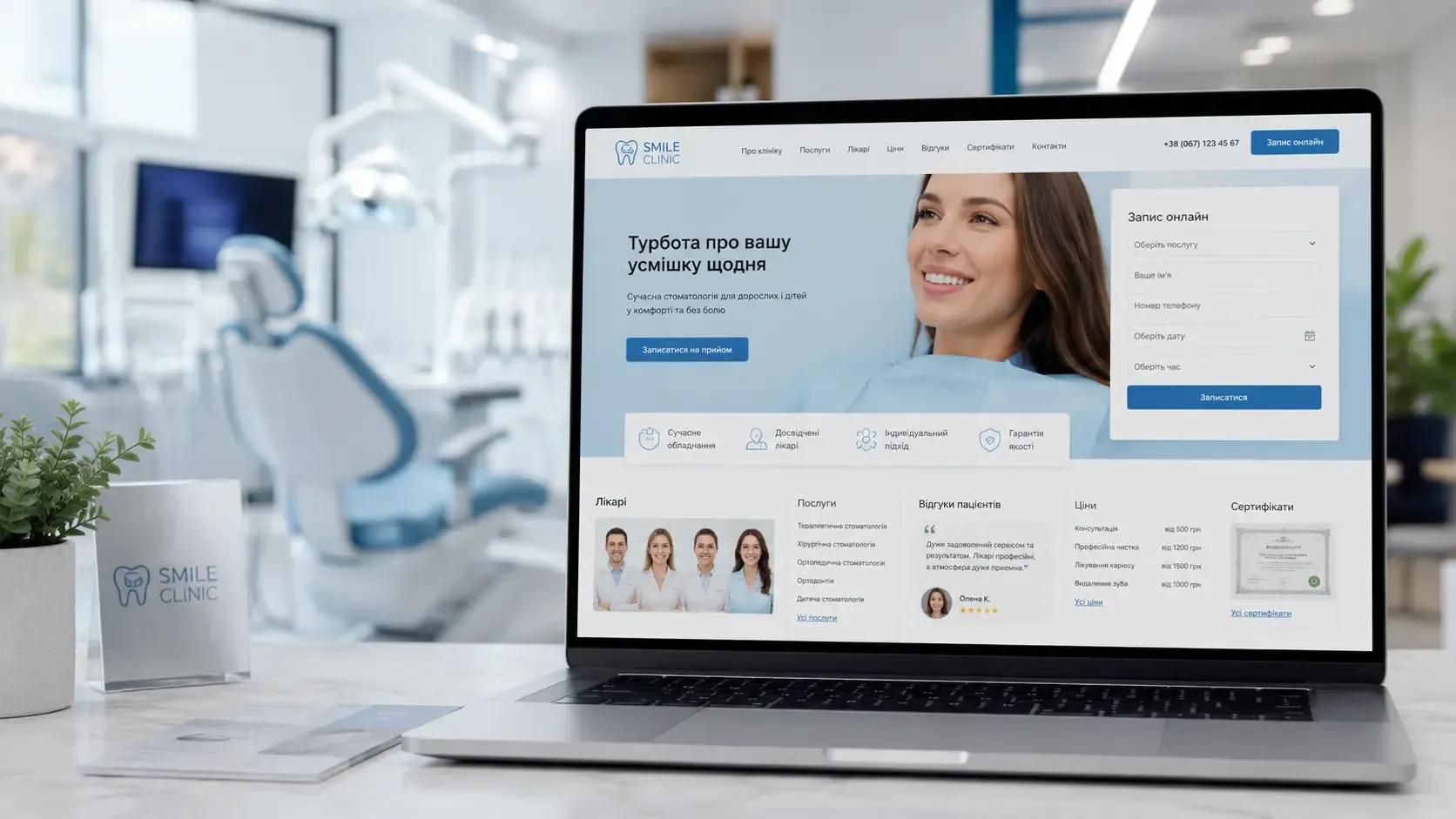
You’ve set up a clinic, equipped the offices, and hired qualified doctors. But if your website isn’t converting visitors into patients, you’re losing potential clients before they even step into your office. A modern dental clinic website isn’t just a business card with a list of services—it’s a tool that must:
- Demonstrate professionalism through high-quality content and design;
- Explain treatments in accessible language to reduce fear and doubts;
- Showcase the team and clinic from the inside so patients feel comfortable;
- Provide transparent information about prices, conditions, and reviews;
- Enable quick online booking without unnecessary calls.
Let’s break down what blocks a dental clinic website must have to not just inform but convert visitors into patients.
1. Hero Block: Clear Value Proposition and Visual Trust
First impressions form in 3-5 seconds. If your homepage only features a generic banner with text like "We care about your health," the patient is more likely to close the tab than explore further.
What the hero block must include:
- A headline with a concrete benefit. For example: "Painless and stress-free dental treatment in one visit" or "Pediatric dentistry in a playful format—no tears or fears."
- A short subheading explaining how you achieve this. For example: "We use laser therapy for painless cavity treatment" or "Needle-free anesthesia—cutting-edge technology for your child’s comfort."
- A visual element that reinforces the message. This could be:
- A high-quality photo of the clinic or a procedure;
- A short welcome video from the chief doctor;
- An animation or infographic explaining the treatment process.
- A booking button with a clear call to action: "Book an appointment," "Get a consultation," or "Learn more."
Example from practice: A clinic specializing in implantation could place a short video in the hero block where the doctor explains the advantages of their method, alongside a button like "Calculate the cost of implantation." This immediately filters interested patients and increases conversion.
2. "Our Services" Block: Details That Remove Doubts
A list of services in the format "Cavity treatment—from $40" doesn’t work. Patients want to understand:
- What exactly is included in the price;
- What technologies are used;
- How long the procedure takes;
- Whether there are guarantees.
How to present services effectively:
- Divide services into categories (therapy, surgery, orthodontics, pediatric dentistry, etc.) with filtering options.
- Create a separate page for each service with a detailed description, including:
- A step-by-step treatment process;
- Before/after photos (if possible);
- FAQs about the service;
- Prices or price ranges;
- Guarantees and post-treatment recommendations.
- Use interactive elements, such as:
- A treatment cost calculator;
- A chatbot for service selection;
- A booking form directly from the service card.
Example: For the "Teeth whitening" service, you could create a separate page with sections on:
- How the procedure works;
- What whitening systems are used;
- Photos of results;
- How long the effect lasts;
- Contraindications;
- Cost and promotional offers.
3. "Our Doctors" Block: Personal Connection Before the First Visit
Patients don’t choose clinics—they choose doctors. If there’s no information about your team on the website, visitors won’t trust your institution.
What the "Our Doctors" block must include:
- Photos and videos of doctors in their work environment (not studio shots, but real photos in the clinic).
- A short welcome video from each doctor (15-30 seconds) where they talk about their experience and treatment approach.
- Education and certification information with the option to view scanned documents.
- Specialization and work experience (e.g., "Implant surgeon with 10 years of experience, performed over 500 operations").
- Patient reviews about the specific doctor.
- A booking button for that doctor directly from their profile.
Tip: If your clinic has doctors with narrow specializations (e.g., a pediatric orthodontist or periodontist), highlight them separately on the homepage with their corresponding services.
4. "Patient Reviews" Block: Social Proof in the Digital Age
Reviews are one of the most powerful persuasion tools, but not all reviews work equally effectively.
How to present reviews correctly:
- Use video reviews. Trust in them is 3-4 times higher than in text reviews.
- Include reviews with patient photos (with their permission).
- Structure reviews by service so patients can find feedback on the procedure they’re interested in.
- Add reviews with specific numbers, for example:
- "Cavity treatment took 40 minutes instead of the promised 1 hour—I’m very satisfied";
- "The cost of implantation turned out to be 15% lower than I expected."
- Respond to negative reviews to show you care about patients and are ready to resolve issues.
- Integrate reviews from Google and social media so they update automatically.
Example: For a clinic specializing in orthodontics, an effective video review would feature a patient explaining how the braces installation process went, how long the treatment lasted, and what the result was.
5. "Prices" Block: Transparency as a Conversion Tool
Many clinics hide prices, fearing they’ll scare off patients. But experience shows that transparency increases bookings, as patients can plan their budget in advance.
How to present prices correctly:
- Create a table with basic prices, but add a note: "The exact cost of treatment is calculated individually after an examination."
- Divide prices into categories (diagnostics, therapy, surgery, orthodontics, etc.).
- Show the cost of comprehensive services, for example:
- "Cavity treatment + filling—$50";
- "Comprehensive periodontitis treatment (3 visits)—from $180."
- Add a cost calculator so patients can independently estimate the approximate cost of treatment.
- Offer promotional packages, such as "Teeth cleaning + whitening with a 20% discount."
- Explain what’s included in the price to avoid misunderstandings.
Example: If the cost of implantation depends on the number of teeth and type of implants, create a table:
| Service | Cost (USD) |
|---|---|
| Single tooth implantation | from $450 |
| Implantation with crown | from $670 |
| Full prosthesis on implants | from $4,400 |
Note: "Cost includes consultation, X-ray, implant placement, and crown. Additional tests or treatments are paid separately."
6. "About the Clinic" Block: Show That You’re a Modern Medical Center
Patients want to know where they’ll be treated. If the website lacks photos of the clinic, equipment, and procedures, doubts about professionalism arise.
What the "About the Clinic" block must include:
- Photos and a video tour of the clinic (reception, offices, waiting area, sterilization room).
- Information about equipment: what devices are used, whether there’s digital X-ray, laser, etc.
- Certificates and licenses with the option to view scanned documents.
- Clinic history: when it opened, how many patients it has served, team achievements.
- Partnerships: with equipment and material suppliers.
- Social responsibility: participation in charitable projects, free check-ups for children, etc.
Tip: If your clinic uses unique technologies (e.g., CAD/CAM for same-day crowns), highlight this in a separate block with an explanation of the advantages.
7. "Online Booking Form" Block: Minimal Clicks, Maximum Conversion
The main goal of the website is to turn visitors into patients. If the booking form is complicated or hidden, patients will simply go to a competitor.
How to create an effective booking form:
- Place the form on every page (in the header and footer).
- Keep it as simple as possible: name, phone, service (dropdown list), preferred date and time.
- Add the option to choose a doctor (if the patient has already decided).
- Use an online calendar with available slots so patients can select a convenient time.
- Integrate with CRM so bookings go directly into the system and are assigned to the responsible manager.
- Add booking confirmation via SMS or email with a reminder the day before the visit.
- Enable online deposit payment to reserve the time.
Example: The booking form could look like this:
- Select service: [Dropdown list]
- Select doctor: [Dropdown list or "Any available doctor"]
- Select date and time: [Online calendar with available slots]
- Enter name and phone: [Input fields]
- ["Book now" button]
After submitting the form, the patient receives an SMS confirmation with a calendar link for a reminder.
8. "Quick Contact" Block: Don’t Make Patients Search for Ways to Reach You
Many clinics hide their contact information in the footer or on a separate page. This forces patients to waste time, and they may simply close the website.
What the contact block must include:
- Phone number with a "Call" button (click-to-call).
- Messengers: Viber, Telegram, WhatsApp with quick-access buttons.
- Email and feedback forms for those who prefer not to call.
- Map with address and directions (integrated with Google Maps).
- Working hours with a clear schedule (including breaks and days off).
- Chatbot for quick answers to common questions.
Tip: Place contacts in the header and footer, and add a pop-up window offering assistance if the patient stays on a service page for too long.
9. "Useful Information" Block: Content That Builds Trust and Improves SEO
A blog or section with helpful articles isn’t just an SEO tool—it’s a way to demonstrate your expertise.
What topics to cover:
- Oral hygiene tips: how to brush teeth properly, what toothpaste to choose, how to use dental floss.
- Explanations of dental procedures: what implantation is, how wisdom tooth extraction works, what to do for toothache.
- Myths and facts: "Does it hurt to get braces?", "Is teeth whitening harmful?".
- Clinic news: opening new offices, acquiring equipment, conference participation.
- Interviews with doctors: their advice, stories from practice, answers to common questions.
Example: An article like "How to Prepare Your Child for Their First Dental Visit" not only helps parents but also shows that your clinic cares about the comfort of little patients.
10. "FAQ" Block: Answers Before Questions Are Asked
Patients often have typical questions but aren’t always ready to call or write to ask them. An FAQ section helps dispel doubts and increase bookings.
What questions to include:
- General:
- What documents are needed to book an appointment?
- Do you treat children? From what age?
- Do you work with medical insurance?
- About treatment:
- Does cavity treatment hurt?
- How long does implant placement take?
- What guarantees do you provide for treatment?
- About payment:
- Can I pay in installments?
- Do you accept cashless payments?
- Are there discounts for regular patients?
- About the clinic:
- What doctors work at your clinic? Where did they study?
- Do you have digital X-ray?
- How is instrument sterilization handled?
Tip: Place the FAQ on a separate page and add a link to it in the footer and the "Quick Contact" block.
Conclusion: A Website That Works for Your Business
A dental clinic website isn’t just an online business card—it’s a tool for attracting and retaining patients. To fulfill its function, it must:
- Build trust through high-quality content, clinic and team photos, and patient reviews.
- Explain treatments in accessible language to reduce fears and doubts.
- Demonstrate professionalism through certificates, equipment, and doctors’ education.
- Ensure transparency in prices and conditions.
- Enable quick online booking with minimal clicks.
If your website doesn’t meet these criteria, you’re losing potential patients every day. Modern patients choose clinics not based on proximity to home but on how comfortable and understandable the website is.
Creating a website that converts visitors into patients is an investment in your business’s growth. And this investment will pay off faster than you think.
Ready to create a website that works for your business?
At SwiftyFlux, we develop dental clinic websites that don’t just showcase services but convert visitors into patients. We integrate online booking, CRM, and other automation tools so you can focus on treatment, not paperwork.
FAQ
Is a website for a dental clinic necessary if the clinic already has an Instagram page?
Social media is a good communication tool, but it doesn’t replace a full-fledged website. A website allows you to structure information (services, prices, reviews), provide convenient online booking, improve SEO, and build patient trust through detailed descriptions of the clinic and doctors.
How much does it cost to develop a website for a dental clinic?
The cost depends on the functionality and complexity of the project. A basic business card website with essential blocks can start at $1,100, while a full-fledged website with interactive elements (online booking, cost calculator, CRM integration) can start at $3,000 and up. The exact cost can be determined after discussing requirements.
How often should a dental clinic website be updated?
Website content (news, articles, reviews) should be updated at least once a month to maintain patient interest and improve SEO. Website functionality (e.g., online booking) requires updates less frequently—only when adding new services or integrations.
Should prices for services be added to the website?
Yes, transparency in pricing increases the number of bookings, as patients can plan their budget in advance. Even if the cost depends on individual factors, you can list base prices or price ranges to avoid misunderstandings.
How to integrate a website with a dental clinic CRM?
To integrate a website with a CRM, choose a system that supports API or has ready-made integrations with popular CMS (e.g., WordPress, Tilda). After setting up the integration, all bookings from the website will automatically go into the CRM, where managers can process them.
Is a blog necessary on a dental clinic website?
A blog is a useful tool for SEO and building trust. It allows you to publish helpful articles on hygiene, treatments, and tips, attracting new visitors through search engines. Additionally, a blog demonstrates your expertise and helps patients better understand the clinic’s services.